Showing posts with label Panasonic. Show all posts

2014-10-07

Panasonic DMC-GX7C, Body Only


Concept: 4 out of 5
Execution: 1 out of 5
Yeah, but: Buyer Beware
The Long Version:

The Purchase From Amazon

Reader beware. I'm coming at this review with a very big chip on my shoulder. Here's why.

I purchased a Panasonic GX7 black body from Amazon because it was marked down over a 1/3 from its original MSRP. Now when I purchase a camera body, I expect a camera body properly marked and boxed. That's not what I got. The seller, Web Offers, sold me a broken up body plus lens kit, where the lens had been removed (I assume to sell independently when the 20mm was selling for $100 and more over its initial MSRP). It was not advertised as such on Amazon.

When the box was opened and the body unwrapped, the body/sensor cavity was open, the body cover in another part of the box. Even the box listed the 20mm as part of the overall kit. Web Offers had to have known what it was doing, or what it had. The original SKU label was papered over with another sticker that said "Body only..."

I never expected to get such from a trusted vendor like Amazon. This is the kind of shady behaviour I expect from eBay. My trust in Amazon has taken a bit of a hit over this, especially over sale items Amazon fullfills but are sold by another seller. Mere fulfillment by Amazon isn't enough of a guarantee of quality it would seem. 

Pros

Image Quality

I ran my tests primarily with the Olympus 1.8/17mm lens, but over the short time I had the GX7 I also tested with the 1.8/45mm, the 12-50mm kit zoom and the Panasonic Leica 1.4/25mm. The GX7 handled all of them smoothly and without any issues. From a practical standpoint, focusing with the GX7 in normal Florida light was as fast as the E-M5, or close enough as to be irrelevant as to which was faster.

The GX7 has a 16MP 4:3rds sensor matched with a contemporary Panasonic Venus Engine. For all intents and purposes, the output of the GX7 is indistinguishable from the E-M5 when used as a standard digital camera, that is, using either the EVF or the rear screen to compose and tripping the shutter with the shutter button. There is, however, more to today's cameras than just image quality.

Cons

Handling


I have read the phrase "falls easily to hand" so many times that I'm sick of reading it. The GX7 does not "fall easily" to my hand. I own a number of µ4:3rds bodies; the Olympus E-P2, the E-PL1, the Panasonic GX1 and the Olympus E-M5. I even have a Sony NEX 5N. I know how these small cameras should handle. All of them, in various degrees, have been easy enough to hold, especially over prolonged periods of time. The best handling camera I own by far is the E-M5, and that's whether I have the HLD-6 horizontal grip bolted on or not (I don't usually shoot with the vertical grip).

When I'm out using a camera I walk around carrying my camera in my right hand so that it's quick to bring up and use. Using the GX7 in this manner is awkward and becomes fatiguing over time compared to my other cameras. I attribute this in part to the GX7's oddly asymmetrical design, the most asymmetrical I've held to date (with the notable exception of the NEX 5N, perhaps).

Unlike all other µ4:3rds camera bodies I own, the lens mount is shoved to the right edge of the body (forward view); the lens release abuts the edge. Even the GX1 lens mount isn't pushed that far. Add in the large soft lump on the left that passes for the grip and it makes for an awkward combination with any lens, the larger the more awkward. The best handling combination was with the 17mm, followed closely by the 45mm. The worst was a tie between the 25mm and the 12-50mm zoom.


The differences between the GX7 and the E-M5 is not just the front grip but also the back thumb grip; to whit, the E-M5 (and E-M1 and E-M10) have a substantial thumb grip, while the GX7 does not. I believe It's that back thumb grip that allows me to hold the E-M5 with a more relaxed grip. With the GX7 I unconsciously believe I'm constantly ready to drop it because I don't have the same assuring tactile feedback.

The buttons turned out to be very sensitive to touch, so much that the would register a double hit, causing me to skip say a menu entry. It got tiresome having to go back very carefully one step. The worse button by far turned out to be the video button. It is flat against the top deck, right up next to the dial surrounding the shutter release. It was very uncomfortable to reach over and release, a far cry from the far easier button on the E-M5

EVF

The EVF does indeed suffer from rainbow shearing. It's particularly egregious around the white text at the bottom of the EVF. It was so bad that in the end I found myself using the rear LCD almost exclusively. I found the EVF tilting feature a bit of a waste of effort. I've got an Olympus EVF that fits my older Pens, and I've never been all that enamored with its tilting capability either.

Rear Screen

What finally drove me batty was trying to work with the touch LCD on the back of the GX7. My E-M5 has a reasonable oleophobic surface on the screen, which tends to keep my oily fingerprints off and helps to me see what the screen. The GX7 screen was constantly picking up finger oil, which was constantly forcing me to wipe it with a micro fiber cloth.

The GX7 touch screen was almost too sensitive at times. I would inadvertently touch a part of the screen, triggering an exposure, and relocating the focus point. In the end I disabled the touch screen and just used the buttons (those wonderfully over sensitive buttons) to move the focus point if I needed it moved.

The E-M5 touch screen, by comparison, is a joy to use. If there's one feature Olympus nailed with the E-M5 it's how the touch-to-trigger-exposure works. It works flawlessly on the E-M5, and as I've recently discovered, on the E-M10 as well.

Summation

If I had to make a choice between the GX1 and the GX7, I'd choose the GX1. Likewise, I'd choose the E-M5 in a cold minute over the GX7. The GX7 isn't worth the money, even if it's on sale. There are better µ4:3rds bodies to be had, even from Panasonic. Consider, for example, the Panasonic G6 for the same amount of money.

The GX7 has been packed up and sent back to Amazon. In it's place I purchased an Olympus E-M10 body, which turned out to be less than the GX7. It's probably what I should have done to start with, but I wanted to give the rangefinder design with the built-in EVF a whirl, thinking this would be a good fit in my camera bag. It was not

I've sworn off the faux rangefinder designs of every camera maker, including Olympus' Pen series. Funny thing is, with the Olympus EVF plugged into the Pen, the EVF sits over the lens, just like an SLR design such as the OM-D. I've learned my lesson. I'm sticking with the mirrorless SLR designs from here on out regardless of brand, and unless they go truly bonkers, I'm sticking with Olympus.

last updated 7 oct 2014

2014-01-09

A year of LensRentals

For 364 days this year, I didn’t buy a new camera.

It’s not that I didn’t want to. I misplaced my Canon S100, which I enjoyed using. And my other digital system is a Panasonic G1 with a small collection of Micro Four-Third lenses. I like the G1, but it’s over five years old, which may as well be fifty in digital sensor years. It’s time to move on.

However, for a variety of reasons, I’m having trouble deciding what should take its place. And because you can only learn so much from reading reviews online, I’ve been leaning on Lensrentals all year to get more hands-on experience with a wide variety of gear.

What follows are some brief impressions of all the toys I played with in 2013.

Before starting, I’ll fully own up to dilettantism here. A week or two is not nearly long enough to truly judge any camera or lens, particularly with how I was flitting about between brands and formats. And the smarter use of my time would be to just use the stuff I already own. But it can also be quite a bit of fun—even inspiring—to try something new or uncomfortable every now and then. And it (usually!) doesn’t hurt to know what else is out there.

This is also something of a fool’s errand as exciting new cameras are being released faster than I can try them all out without quitting my job or selling my dog.

Finally, Google overlords be damned, I’m not putting any hyphens in product names. I’ve had to look up where they go in “OM-D E-M5” or “X-Pro1” for more often than I'd prefer to admit. It’s gone too far. I’m tired of it. I’m fighting back.

Zeiss ZM C Sonnar 1.5/50

What Matthew said.

I’m having a bit of a love affair with 50mm at the moment, and this may be the most romantic 50mm lens you can buy.

I didn’t spend nearly enough time with this one.

(Although, in my heart of hearts, I think I might be more of a 2/50 Planar type of person.)

Panasonic G5

I went long about the G5 on this very site and concluded:

The G5 checks a lot of boxes but it does so without a lot of pizazz, like an above-average PowerPoint from the accounting department.

Michael Johnston recently called it “very capable but quite bland but very capable”, which is exactly right.

The newer G6 appears to address some of my nits with the G5: the EVF got an update, you can finally (I’m told) disable the toggle button on the command dial, and the camera’s updated look is snazzier – like a mini Leica S2 instead of Frankenstein’s camera. It doesn’t look so much like the bargain that it is.

If you want an EVF and the cost of an EM5, EM1, GH3, GX7 or EP5+VF4 is a bit dear, the G6 looks like a screaming deal.

Fujifilm X100S

The adulation this camera receives is mostly justified. It looks great, feels great, and the autofocus, menu system, and control layout are light years ahead of the original X100.

Image quality is astonishing. I spent a lot of time in Lightroom gobsmacked at the detail and lack of noise at ISO 6400. The 35mm equivalent f/2 lens is well matched to the sensor. It’s also more or less my ideal walk-around setup, but that’s maybe because I’ve been walking about with a Zeiss Ikon and the 2/35 Biogon for a few years.

The aperture ring has firm whole-stop clicks that feel much nicer than the mushy third-stop clicks on the 35mm XF lens I used.

As with the XPro1, fumbling between viewfinders is still a point of friction for me. I had more fun if I forced myself to use only one and lived with its limitations. I’m also certain that with more experience I’d better be able to predict when I’m about to brush up against those limitations.

I lusted after this camera so badly … right up until I tried a Ricoh GR.

Fujifilm XPro1 & Fujinon XF 35mm f/1.4

I wrote a longer review of this pair. I'd call it tough but fair.

I would like to give the XE line a try; with only an electronic viewfinder my suspicion is that the XE will be slightly easier to use—if slightly less fun without the optical viewfinder, also.

Olympus OMD EM5

I understand why people adore this camera.

It’s a lot of camera packed into a tiny space. The pictures online can mislead you into thinking it’s the same size as any other DSLR, but hold one for yourself and you’ll probably be as astonished as I was.

The specs are great. The pictures are wonderful. The new stabilization system is a miracle worker. You can customize nearly every aspect of its operation. Everything is super responsive, with a “yessir!anythingyouwantsir!” zippiness. It’s built like a fine precision instrument: quality and choice of materials is top-notch everywhere.

Again, I totally understand why people love the little thing.

But …

(here come the emails)

… together with our oversize brains, our hands have kept us humans on top of the food chain for two million years. So it is with some alarm that I report that our hands have a new enemy: the OMD EM5.

I could not get comfortable holding it. I don’t mean it like “well the corner pokes a little” (it does) but rather much worse: it outright hurts to hold it for longer than a minute. I didn’t find the textured area on the front sufficiently grippy, the thumb rest forces your hand into a cramped position, and it’s an awkward reach to both command dials, especially the rear one. The angles are just all wrong for my hands.

(Your mileage on this will vary, but I was relieved to find out that I’m not the only one that feels this way.)

The HLD6 add-on grip helps some. But if you determine that you’ll need the grip, you might as well buy an EM1. You’ll even get a bigger, more awesome viewfinder as a bonus.

All this to say: definitely spend a decent chunk of time holding an EM5 (or any camera!) before you drop a grand on one.

Panasonic GX7

My initial impression is that this is the current Micro4/3 sweet spot in balancing handling, advanced features, customizability, performance, image quality, size, and price.

I still want to take the GH3, EM1, and maybe a G6 for a spin, but unless they really impress me I think the GX7 will be the next system camera I buy.

Pentax K5 & 35mm f/2.8 Macro Limited

I wasn’t sure such a camera existed: the K5 has all the physical controls I want in exactly the place I want them.

This includes the Pentax-specific “Green”/“*” button, which powers the ridiculously named but seriously powerful Hyper-Program and Hyper-Manual modes. Lemme tell ya: every semi-serious photographer should take those modes for a spin. Hyper-Program is your basic Program mode but with instant access to Aperture Priority or Shutter Priority, no mode dial required; Hyper-Manual gives you the stability and predictability of full Manual mode but with vastly less needle-chasing. Either might totally change how you shoot. I can’t believe other brands haven’t copied these.

The camera is solid, heavy, and reassuring for those times when you need a bigger dick to swing around. But it’s still a soft touch: the shutter and mirror are shockingly quiet for a DSLR.

As for the 35mm Macro, no one makes DSLR lenses like the Pentax Limiteds anymore. It backs up the forged good looks with excellent image quality and almost no flaws. It even has a built-in hood, which is handy. Shame it’s not weather-sealed to match the camera.

This mostly confirms my suspicion that Pentax makes the only APS-C DSLRs worth looking at.

Ricoh GV2 28mm viewfinder

It’s tiny! But I had difficulty seeing the entire frame with glasses on. So it’s not very fun.

Also you’re missing out on the toy-camera good looks of the larger GV1 viewfinder.

Pass.

Ricoh GR

Matthew’s recent ongoing praise is not even a little out of line: The GR is the smartest, best thought-out digital camera I’ve ever used. It treats an advanced photographer with respect instead of ambivalence or (too often!) hostility. Because I haven't used any of the GR's predecessors, I'm so astonished at the design and usability that the huge image quality packed into a tiny box is almost the least impressive thing about it.

A major flaw is that I don’t think I see well with a 28mm-equivalent lens. I could learn.

In fact, I better: I ordered one for keeps on New Years Eve and it showed up yesterday.

2013-06-02

Panasonic Lumix DMC-GX1 Silver, Part 2

Panasonic Lumix GX1 with Lumix 2.5/14mm

Concept: 3 out of 5
Execution: 3 out of 5
Yeah, but:  It may be small but it takes a while to write about it.
The Long Version:

This is the second part of a two-part thewsreviews review. Part one is here. Which means it's based on a paid-for copy and it touches on what strikes my fancy, which may not strike yours. Now onward...

As I mentioned earlier the GX1 is a "dense" feeling little camera with what appears to be an all-metal body (with the notable exception of the top plate and the battery cover on the bottom). By the time you have any lens mounted and the battery in the base you know you have a substantial piece of machinery. The only camera in my arsenal that feels anything like this, if not better, is the Olympus OMD E-M5. Which brings me back to the battery cover. It is as cheap as the rest of the body isn't. It's thin and flimsy and may very well wind up being broken before too much longer. Which means I better look for a few spares from somewhere...

To be fair to Olympus, the E-M5 is better in my not so humble opinion. And I would imagine, not having held one, that the Panasonic GH3 is in the same league as the E-M5, at least as far as build quality. But still and all the GX1 is no slouch (with the notable exception of the battery cover), and for the discounted prices you can find for the GX1 at right now it makes an excellent camera.
Top deck with major controls
The top controls for the GX1 are clustered around the upper right. You're limited to the on/off switch (a real switch, extra points for that), the mode dial, the shutter release, an IA push button, and a movie start/stop push button. The IA and movie buttons are small and set flush into the deck to avoid accidental triggering. You can argue if this is the best place to put these buttons, especially the movie button, but considering that Olympus and Sony have put them on the back where they are easier to reach by hand as well as accidentally trigger, I think putting them here was a good idea. Filming is not the same as taking stills, and I don't mean the obvious. It's a different process and mindset where you don't have to have the movie trigger as easily accessible as say the shutter trigger. In my mind Panasonic made the right placement choice on this camera.

The only controls I pay any attention to on the top deck outside the shutter release is the mode dial, and it stays on 'A' (aperture control) almost the whole time. I might go to 'S' (shutter control) for a deliberate slow shutter speed, or 'M' (manual) when I want to set the exposure once and have every other image come out the same (and I'll set ISO and white balance as well in that case). But I've yet to dive into and try any of the other modes (C1, C2, SCN (scene) and that funky symbol which is Panasonic's version of art filters).

By the way, that funky symbol, which is supposed to be an art pallet and paint brush (yes, I once took art in college), selects Creative Control on the camera, from which you can select from eight different controls. I've yet to try them out and if I do will probably review them separately. For now I'm busy just using the GX1 as a "real" camera, whatever that means.

The movement of the mode dial and on/off toggle are solid and stiff, which is what you want. Too many of the Olympus Pens, specifically the E-P2, have dials that are too easy to twist especially when the bodies are held against the body and you're moving (i.e. walking) about.
Back with major controls and Q.Menu selecting RAW + largest JPEG output
The back of the camera is dominated by an LCD with touch capabilities. This makes the third such camera with this capability I've purchased. The first was the Sony NEX 5N, and after less than 30 minutes I went into its menu system and turned it off it became so frustrating. The second is the OMD E-M5, and it is so good I just about can't use the camera without it. The GX1 falls right in the middle of those two. While I certainly won't disable that feature I've yet to find where it will become a critical feature. Perhaps over time I'll learn to love it more. It does have touch-to-trigger on the LCD like the E-M5, a feature where touching the LCD will focus the camera's lens before taking the photograph. I love the way it's implemented on the E-M5; it's hair-trigger in a good way and the focusing on the E-M5 is lightning fast and accurate. It's a great tool for picking the focus point in rapid action or complex scene. The GX1 by comparison is slower. If my photography is more measured (meaning slower, and a lot of it is) then the GX1 touch-to-focus is just as accurate. It's just not nearly as fast, and I attribute that in large part to the slower focusing speed of the GX1.

Many users, myself included, talk about the Super Control Panel available on Olympus LCDs. It's been a camera feature since at least the Olympus E-3 for me, and it has undergone refinements over time. You access it by pressing the 'OK' button on the back of Olympus cameras. For some Olympus cameras (E-3, E-M5) it sits right in the middle of the LCD, while on others (E-P2, E-PL1, E-PL2) it wraps around the bottom and right edges. In both cases the rounded buttons around 'OK' serve as navigation buttons on the Super Control Panel to pick a feature and adjust it. It's a fast way to set the most-often modified camera features. The Panasonic GX1 has something similar called the Q.Menu, which has its own dedicated button on the bottom, right next to the LCD's bottom right corner. You hit the Q.Menu button, then navigate around to pick a feature to modify, modify it, and then touch Q.Menu or the shutter to exit. I can't say if it's better or worse than the Olympus, which is actually a good thing. I will say this, it's leagues above the Sony menu system.

If there's a nit to pick over the Panasonic menu system it's that the text rendering is crude when displayed on the LCD. It looks like somebody in management decided that the older menu software was Good Enough, and refused to spend a little more money to clean up the text. Olympus did a good job cleaning up the text in their menus starting with the E-PL2, which is the same vintage as the GX1. The GX1 is a nicely refined little camera, which makes the crude menu text just that much more jarring when you see it.

There are two definable hardware function buttons on the back of the GX1 labeled Fn1 and Fn2. You can find where to set these in the menu. They are worth setting up. There are two "soft" buttons on the LCD which slide out from the right edge, Fn3 and Fn4. They are not worth setting up. They are difficult to "pull out" from the right edge of the LCD and do nothing but frustrate you when trying to reach them. The only reason for trying to use the slide-out tray is to enable or disable the LCD touch-to-trigger functionality. Once I had it enabled I pretty much left the slide-out tray alone.

The one lone wheel on the GX1 is buried in the plastic thumb rest on the top right corner. It's a surprising control in that it's both a wheel and a push-button switch. I use it to control aperture and EV compensation, and that's accomplished by the push-button action. You press the wheel in to set either aperture or EV compensation, then turn the wheel to make the changes. You know which function you're accomplishing because the values for aperture and EV change color on the bottom of the LCD. If you can change it, it's yellow. If you can't, it's white. The wheel is stiff enough not to be accidentally turned, and the button stiff enough not to accidentally press it in. It's a clever engineering solution and I like it. Yes, it slows you down over a two-wheel design, but I change aperture (or shutter speed) a lot more than EV compensation so it's not that big a difference for me.

I'm sure there's lots of additional features I haven't delved into, but I've had the camera now for about a week. My attitude is if I can't dive into a camera after opening the box and start taking photos after about 30 minutes, as bad as they might be at first, then it's a crap camera. None of my cameras are that way, although two were over the years and they were sent back. I can grumble about certain features, but the key is how quickly can I configure the camera to my tastes and what kind of results can I get. All of my cameras pass that basic test with flying colors (or black and white... sorry).

This is the last of the 20mm photos. It was processed in LR 4.4 to bring out color and detail, of which the 16MP sensor has loads. And that's another reason for getting the GX1. It's sensor resolution matches the E-M5. The E-M5 sensor has a lot more exposure headroom than the GX1 and I've seen it, but in a lot of circumstances the GX1 can produce acceptable, if not beautiful, results in the right kind of light that doesn't stretch the sensors exposure limits (and isn't that true about every camera ever made?).
Monochrome, ISO 3200, straight out of camera
These two photos were produced from the same GX1 raw image. I used touch-to-shoot to bring the E-M5 text into focus, and let the rest of the focus fall where it may. I have auto ISO enabled up to ISO 3200 and that's what you have here, a pair of ISO 3200 images. The upper photo, if you care to pixel peep, has a lot of processing artifacts in the darker regions that look very crystalline in nature. The bottom photo was produced in LR 4.4 and Silver Efex Pro 2, and has a more grainy, film-like noise. I don't mind noise, I just wish it were more like large clumps of random developed silver. The hard part about doing this is I like the tones of the in-camera photo. I tried to match that look with SEP, but wound up pulling too much up out of the shadows to suit my tastes. Under most circumstances, even up to ISO 3200, I would probably accept it and move on. Shrink the image down enough, put it on the web, and nobody will know nor care. Only a pixel-peeping idiot like me would even bother.
Monochrome, ISO 3200, post processed

These last five photos were taken with the GX1 and the Panasonic Lumix 2.5/14mm lens. I have this lens and chose this combination because of all the interesting press that's been generated lately by cameras such as the Nikon Coolpix A, the Ricoh GRD V (which Matthew dreams about constantly these days) and the Fuji X100/s. All of these cameras have an APS-C sensor, an equivalent 28mm with a max aperture between f/2.8 and f/2 (the Fuji). The Lumix 14mm is a 28mm equivalent, and its max aperture of f/2.5 sits between those other cameras. Whether the GX1 plus 14mm is as good as those other cameras with fixed focal length lenses is open to considerable subjective interpretation, so have at it. I do know that if I have the 14mm on the GX1 I can slip the combination into a rather capacious pocket on my cargo shorts and go anywhere incognito (well, maybe the cargo shorts draw attention, but that's another issue). And the same thing can be said for the even faster 1.7/20mm.

The monochrome photos are straight out of the GX1. The color photos were manhandled by me in LR 4.4 and Color Efex Pro 4. Enjoy.

last updated 2 June 2013

2013-05-29

Panasonic Lumix DMC-GX1 Silver, Part 1

Panasonic Lumix GX1 with Lumix 1.7/20mm

Concept: 3 out of 5
Execution: 3 out of 5
Yeah, but: It now costs 1/5 what it originally sold for.
The Long Version:

It may say "Henry" on my birth certificate but my middle name is really "Cheap." That's why I wait until the very end of a product's lifecycle to pick up a lot of µ4:3rds camera gear, especially camera bodies. I did that with my E-PL1 (US$150) and my E-PL2 (US$200). And I did it again when the price of the Panasonic GX1 body dropped to $200. With free shipping.

My primary reason for owning a Panasonic body is to have a reference against which to use my three Panasonic Lumix lenses; the 14mm, the 20mm, and the 25mm. I've never had any issues using any of those lenses with any of my Olympus µ4:3rds bodies, including the OMD E-M5, but I keep reading about the terrible problems other posters in other fora seem to have when using one vendor's lenses (Panasonic) with the other's bodies (Olympus). So far I'm happy to report that all my Panasonic lenses work just fine with the GX1, just like they work just fine with all the Olympus bodies I own. And if you think I own too many µ4:3rds bodies, I direct your attention to photographer William Eggleston's fine collection of Canon and Leica rangefinder cameras. I got nothin' on him.

In The Beginning...

The GX1 was first introduced nearly 18 months ago with a 14-42mm X kit lens for US$950. That put it squarely in the same price league as the Olympus E-P3.  I'd already heavily panned the E-P3 on my personal blog, stating in no uncertain terms that hell would freeze over before I'd buy an E-P3 at Olympus' asking price. Two years later, even with the heavy discounts the E-P3 has undergone, I still feel no desire to own a copy. I took a dim view of the E-P3 and unfortunately cast the same jaundiced eye towards the GX1 when it was introduced. That was my loss.

With 20/20 hindsight I've come to realize the GX1 does have some key advantages over the E-P3. Foremost is the GX1's sensor vs the E-P3's. At 16MP, it could be argued the GX1's additional 4MP won't buy you much and you're probably right as far as raw resolution goes. But there's a lot more going on with that sensor and associated image processor than just four additional megapixels. Quoting DPReview conclusions about the E-P3 from August 2011: "The E-P3's biggest problem, through, is that its 12MP sensor is essentially the same as that which we first saw in the Panasonic Lumix DMC-G1 almost three years ago, and in the face of rapid progress from other manufacturers it's now looking distinctly dated." The GX1 borrowed the sensor from the G3, which was released the same time as the E-P3, and which had at least two years of refinement behind it. DPReview's conclusions about the G3 (and later the GX1) were glowingly effusive in comparison to their E-P3 conclusions. I don't mind buying a two-year-old sensor from Panasonic, but five years for Olympus is more than a bit of a stretch, especially when I realize it's the same sensor I have in the E-P2, E-PL1 and E-PL2. Note that while I still don't care for the E-P3, my feelings for the OMD E-M5 are just the opposite, which I own and like greatly. You can have my E-M5 when you pry it from my cold dead fingers. But I digress...

Working with the GX1

The GX1 has a compact body with a design quite reminiscent of the Olympus E-PL2. Sit the two side-by-side and the Panasonic GX1 and Olympus E-PL2 look more alike than different, even if the E-PL2 is supposed to be channeling the old Olympus film Pen lines. Their construction bears remarkable similarities, even down to the use of the same number and placement Phillips screws on both ends of the body as well as across the bottom plate of the body. You'd think they came out of the same design bureau.

Dig a little deeper physically and there are differences between the two. The E-PL2 makes greater use of composites ("plastics") in its body, while the GX1 body is nearly all metal (the E-PL2 used metal on the front face plate, composite on the back). The tripod mount on the GX1 lines up with the lens mount and sensor, while it's very offset on the E-PL2. There're more direct controls on the GX1. Finally, there's an explicit on-off power switch on the GX1 top plate that wasn't mimicked by Olympus until the E-M5 and the just-announced E-P5. The construction, at first blush, appears a bit more robust with the GX1, although I wouldn't classify the E-PL2's construction as either poor or flimsy, far from it. They both exude good quality fit and finish. The best way to describe the GX1 with a Lumix 1.7/20mm and the battery is "dense", which goes to further reinforce the feeling of quality with the GX1.

Out in the field the GX1 is fairly easy to get to work the way I expect all my cameras to work. The menus in the GX1 are radically different from the Olympus Pens, which is to be expected. The GX1 menus are fairly "flat" (few menu levels) while the Olympus cameras have greater depth (more levels to traverse). Having now had to deal with both I don't see where either one is better than the other. They're both equally bad in my not so humble opinion, but their menu systems aren't deal breakers. You dive in, learn the menu layout, make your changes, and then get on with photography.

I'll note at this point in the review that I set auto review to '0' (turning it off) and turned the focus assist light off. With auto review off there is no apparent delay between shutter releases (having the image pop up like that always surprises me enough to cause me to delay, even if very briefly). With the focus assist light off the camera and I are a bit more stealthy, and the battery lasts a bit longer.

As I noted earlier the GX1's sensor resolution is 16MP, which matches the resolution of the OMD E-M5. However if you look at the sensor scores for those two cameras at DxOMark, you'll see that the overall score of the E-M5 is 20 points greater than the GX1. That's pretty substantial and is due in part to the E-M5's greater exposure range (about 1 1/2 stops if I read the numbers correctly). From my limited experience so far with the GX1 with the 20mm produces excellent results, especially close to base ISO. I've set auto ISO on the GX1 with a maximum of ISO 3200. While I've gotten fairly high, I've yet to reach a point where noise has become a problem.
ISO 250
ISO 160
Monochrome, ISO 400
ISO 1000
The GX1 in Black and White, or the Poor Man's Leica M Monochrom

I have tried for years to get a decent monochrome exposure out of the Olympus Pens, and for my uses I've been pretty dissatisfied. And then, on a whim, I set the GX1 to Monochrome Photo Style, and further tweaked the following settings: Contrast -1, Sharpness +1, Saturation -1, and Noise Reduction -2. It took a few times to reach those settings, but once there I realized I'd finally found a decent monochrome µ4:3rds body. Coupled with the 1.7/20mm and I suddenly had a pretty decent "artsy" camera that more than satisfied my wants. I love the deep blacks that come out of the GX1 instead of the muddy darks that the Olympus produces. If I had any doubt about keeping the GX1 that doubt was completely removed when I saw the SOOC black and white JPEGs it produces.
ISO 800
ISO 160
The last two photos show what the GX1 RAW files are capable of. The top photo is straight out of the camera. The "problem" with the top photo is that the sky looks overexposed with what many in the fora would call blown-out highlights (which I don't totally agree with). The bottom photo is the RAW file with LR 4.4's highlight slider set to -100 to recover the maximum information from the highlights. Now you can distinctly see the clouds in the sky.

Unfortunately it has also brought up a lot more detail in the mid-tones, especially in the bushes and across the car hood in the lower left corner. The top photo seems softer, more romantic, but there's enough detail and byte in the bushes to add interested to the overall composition. The bottom photo has too much busy detail. But these are meant to be references and comparisons. If I were really serious about producing a good final image and print from these files, I'd use at least two layers in Photoshop, one for the sky and the other for everything else, to isolate changes to the clouds in the sky. It would be the same as me burning a bit of the sky in a wet darkroom in the past.
ISO 160
Edited with LR 4.4 and Silver Efex Pro 2

That pretty much wraps up the first part of this review. In the final part I'll spend more time examining the ergonomics and how the GX1 compares with the E-PL2 and the E-M5. In the mean time, if you want a recommendation on whether to buy a GX1 or not, I heartily recommend you grab a copy while the price is down to $200. If you don't have any µ4:3rds lenses then I recommend either the Lumix 1.7/20mm (40mm equivalent) for $350 or the 2.4/14mm (28mm equivalent) for $250. If you get the 14mm you'll discover you have a camera that competes with the latest fixed lens cameras from Ricoh and Nikon that also have 28mm f/2.8 equivalent lenses, except they cost a whole lot more money and they're fixed lens

Technical

Hero photo of the GX1 taken with the Olympus E-M5 and M.Zuiko 12-50mm set at macro mode. All other photos taken with the GX1 and 1.7/20mm set at f/1.7. Color photos were processed in LR 4.4 and Color Efex Pro from RAW. Black and white were SooC except where noted.
last updated 29 may 2013

2012-01-29

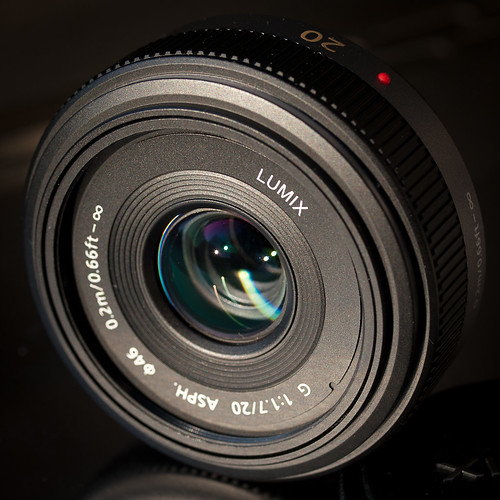
Panasonic Lumix G 20mm F1.7 ASPH.

Panasonic 20mm Side

Concept: 4 out of 5
Execution: 3 out of 5
Yeah, but: So what took me so long?

The Long Version:

This is the second review of this lens. Matthew wrote the first, an excellent review when he purchased his copy over a year and a half ago. Rather than repeat what he wrote, I'll refer you to his review. I'll wait here while you go and read it.

I first considered the 20mm when Matthew wrote his review. Unfortunately the price at that time for the 20mm was its MSRP of $400, or $150 more than the Olympus 17mm. So being the cheap guy that I am I purchased the 17mm and went off happily using it for all sorts of subjects, none the wiser.

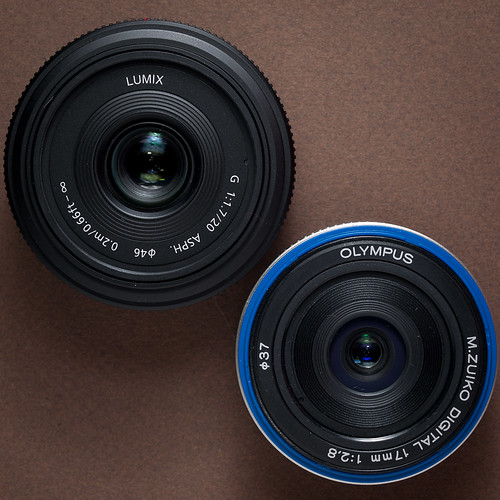
Panasonic 20mm and M.Zuiko 17mm
Panasonic 20mm on the left, Olympus 17mm on the right,
minus its front cosmetic outer ring.

I even wrote a review about the 17mm not long after Matthew wrote his 20mm review, extolling the 17mm's virtues. Over the period I've owned the 17mm I've certainly taken my fair share of photographs with it. Yet, in spite of its lower price and slightly smaller size, there's one key feature that the Panasonic has that's superior to the 17mm; the 20mm is one-and-a-half stops faster than the 17mm. This feature alone makes it superior to the 17mm in very low light situations or situations where excellent separation of foreground subject from background is needed. When the price of the 20mm dropped to near $300 this past December, I finally purchased a copy for myself.

Self Portrait - First Light 20mm
Self portrait - First Light 20mm

As I mentioned one of the two key features I found attractive about this lens is its separation of foreground and background in a very tiny package. When the 20mm arrived the first thing I did was slap in on my E-P2, set it to f/1.7, turn the camera back around to face me and fire off this lovely portrait. Look at the larger version (if you can stand to) and you'll note that elements in focus in the center part of the image are quite sharp and clear, such as my glasses frame, the dirt on my face, and the strands of my thinning hair straggling down over my furrowed brow. I also like the way that focus quite rapidly drops off, which you can see on the shoulders of my t-shirt. I've quickly come to appreciate the quality of this lens wide open, and make it a habit to shoot with it wide open as much as possible.

Chimping Her Camera

The lens' wide aperture of f/1.7 comes in handy in low-light situations. In this photo I was able to keep the ISO down to 400, which is only one stop faster than the E-P2's base ISO of 200. If I'd had the 17mm I would have had to move it up to ISO 1,000, where noise begins to show up. I know what's been written elsewhere about the E-P2's high ISO performance and how it's acceptable up to ISO 1,600, but it's been my experience to keep ISO as close to base as possible. So I juggle shutter speed, f-stop, and ISO in these situations, giving priority to keeping the ISO as low as practical. It's a shooting methodology I've had since my first days of 35mm film. After over 40 years of photography I much prefer to shoot no higher than ASAISO 400.

Welcome to Lake City Florida

Another feature I've come to appreciate with this lens is its apparent lack of barrel distortion or pin cushioning regardless of the aperture setting. The 17mm has noticeable pin cushioning wide open (f/2.8), which begins to clean up one stop down and is almost completely gone by f/5.6. But the 20mm doesn't have any to speak of, which makes shooting architecture a real joy, particularly when you don't have to clean up any distortion in post. And if you think you see distortion above, let me assure you that the concrete sidewalk in front of that Greyhound station is actually warped.

Tifton

The 20mm also has a different color character from the 17mm. I can't quantify what is different about the 20mm, but I like the colors that come out of the 20mm mounted on the E-P2. While the 17mm is quite capable of producing great color under the same lighting, I have to give the nod to the 20mm.

Ride 'em Cowboy

The 20mm makes for a superb all-around travel lens, capable of rendering exquisite detail between f/5.6 to f/8 in broad daylight. The photo above was taken with the E-P2's ISO set to 200. The 20mm coupled with the dynamic range of the sensor at this ISO can produce some pretty remarkable results.

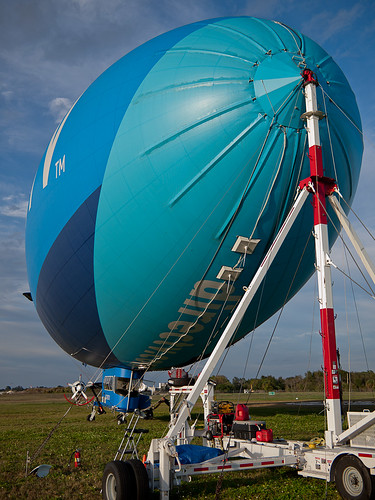
Blimp Starboard Mooring

Although the field of view of the 20mm is definately less than the 17mm (57° vs 65° respectively), it's still wide enough that with careful composition you can dramatically photograph large objects such as the DirecTV blimp. In the photo above the 20mm was stopped down to f/2.8 and ISO once again set to 100. The lighting, the dynamic range, and the depth of field, coupled with the focal point gives the appearance of sharp focus from the mooring tower to the airship's tail. Yet the background is out of focus enough to help hold the viewer's attention on the airship. I can honestly say I could not have achieved this level of image quality with the 17mm at its widest, f/2.8.

Conclusions

As good as the Olympus 17mm is, especially stopped down, the Panasonic 20mm is better, especially when you realize that the 20mm is already closed down 1 1/2 stops at f/2.8. While the 17mm is physically smaller, it's only barely so.

The 20mm actually gives exposure "breathing room" to the E-P2, allowing it to be used at lower ISOs more consistently than with any other µ4/3rds lens except the M.Zuiko 45mm 1:1.8 (which I also now own) and the M.Zuiko 12mm 1:2. And with the drop in price of the 20mm bringing the price differential between the 17mm and the 20mm to less than $100, there's no real reason to purchase the 17mm independent of the 20mm any more.

There's also the issue of build quality. I've groused about this already, but I'll say it again; ever since the early 1980s starting with Olympus OM equipment I've never had bits fall off of any Olympus lens, except for the 17mm. While I was on a trip to Boston last March the front outer ring over the blue plastic you see on the 17mm above simply fell off and onto the ground. I heard it hit but never found it in the street. The 17mm still functions, but the idea of something just falling off bothers me and gives the lens a bad mark in my book. The 20mm looks and feels better built than the 17mm. Hopefully nothing will fall off the 20mm during normal use.

I'm glad I have the 17mm, and I'm glad I had it for as long as I did. It served yeoman duty and was the most used lens of all my regular and micro 4/3rds lenses. But I've got the 20mm now, and it's going to cut into the use of the 17mm considerably, and that seems a bit sad. I wish that Olympus had released an f/2 version of the 17mm, and beefed it up a bit, but Olympus was apparently working on the M.Zuiko 12mm 1:2. At its current price of around $700, I don't think I'll be picking up a copy any time soon, so the 17mm will take the spot the 12 would have if my budget would allow it.

When Matthew wrote his review back in 2010 he called the Panasonic 20mm "the single best lens available for micro four-thirds cameras." While it now has to contend with the Olympus M.Zuiko 45mm and 12mm lenses, it still holds its own quite well with those two lenses. It isn't that the Panasonic 20mm is any worse for the Olympus lenses, it's that Olympus has finally stepped up its game to at least match the 20mm. The 20mm is still well worth the purchase, especially as part of a trifecta composed of the 12 and 45mm lenses.

last updated 29 january 2012

2011-08-19

Panasonic's TS3 Floating Strap and Silicone Skin


Concept: 3 out of 5
Execution: 3 out of 5
Yeah, but: The best gets even better accessorized.

The Long Version: English is full of three-word phrases that have special meaning and significance, but few are more touching than "Free With Purchase". Panasonic Canada has taken it upon themselves to release a silicone skin and floating strap for the TS3, and for a while was even giving it out for free to people who had already bought the camera. How cool is that?

Officially called the "DMW-TS3 Kit", there's almost no information about this accessory bundle online, and what little there is all seems to be from Canada. Sorry, rest of the world – but perhaps there's something better scheduled for you.


The silicone skin is that translucent milky-white that makes me wish I had never heard Ray Beschizza say the phrase 'the colour of semen'. Otherwise it's very nicely made, fitting the camera perfectly with crisp cut-outs for the controls, LCD, and lens. The material adds tremendously to the grippiness of the camera and takes it even farther by putting circular depressions across the hand grip.

The floating strap is fabric-covered neoprene that's orange on the outside and blue on the inside, nicely complimenting the most popular camera colours. (If you bought their dirty-lipstick-red colour, well, what did you expect?) When the camera hits the water the strap is plainly visible and stands about an inch above the surface, making it easy to grab. It doesn't tighten down the way the string wrist strap does, but it fits my average-sized wrist snugly and the broad band keeps it in place.


Naturally, there are a couple more things that need to be said. The silicone skin blocks the camera's battery and card slot, which should help to keep sand way from the locking mechanism, but it needs to be pulled aside for access. It also traps water beneath it, so it needs to be completely removed if the camera has been immersed. The grippiness of the silicone also makes it more difficult to put in a case or a pocket, so even though it adds shock and scratch protection, I may not use it most of the time.

The floating strap, which stays wet for a really remarkably long time, is too big to pass through the skin's little cutout for the attachment point. Instead it uses a quick-release clip on its tether; if the standard strap used the same clip life would be easier, but instead the strings need to be unlooped from the camera the hard way. It's tough to casually switch back and forth, but the floater is certainly worth putting on before getting into the canoe. The other alternative is to daisy-chain the floating strap to the original one, which is what I'll do when I just want to throw the camera into the pool.


I have to say that I'm really happy with the strap and case, and it's worth checking with your local camera store to see if they're offering it as well. Do be warned, though, that some stores would rather sell these accessory kits for $30 each. I can't blame them, and it's a good kit – the floating strap is the best I've seen – but I really was handed mine for free just because I'd already bought the matching camera. Naturally, Panasonic's website makes no mention of any special offer for present or future owners of the TS3; I'll add more detailed information if I can get it.

updated december 2011:  not everything that I write can withstand the test of time. When I wrote this Panasonic was providing this for free from a few special retailers, but unfortunately that program has come to an end. I can still say that this is the best floating strap that I've seen, and very good silicone skin, but whether that's worth the $30 that these kits now retail for is a personal matter. I'd probably have bought it, just to have the dedicated accessories, but they do have their specific niche.


last updated 15 dec 2011

2011-06-29

100 Days with the Panasonic TS3


Concept: 2 out of 5
Execution: 3 out of 5
Yeah, but: It's still the best.*

The Long Version: Digital cameras are funny things. There's no reason why one that's properly taken care of won't live for seven or eight years, but in market terms they're obsolete in a tenth of that. A compact camera has no chance to become a competent and well-rounded member of electronic society before being forced to make its way in the world, ultimately being replaced by another immature model that promises a slight improvement over what came before.

The Panasonic TS3 is the the fourth waterproof camera that Panasonic has made, starting with the TS1 which was released in 2009. We know that it's better than the TS2 because it has a higher model number, and it's more expensive than the TS10. I've been using one daily for three months now, and to celebrate I decided to hang out with it for a saturday afternoon in Coney Island. That's where I took the photos for my first look at this little camera, so redoing the twenty-three hours in transit just felt right.


I spent very little time on image quality in my first look, so that's where I'll start here. Frequently decent, typically good, rarely outstanding: the TS3 isn't designed for peak performance, and that's okay. Being happy with any compact camera is a matter of having realistic expectations. When I use it in perfect conditions and look at the photos with a critical eye at high magnifications, I'm frequently disappointed to see that the fine detail is blocky, pixelated, and smeared. In low light or bad conditions my forgiving spirit will be pleased with the successes and accepting of its failures, even though the results are still blocky, pixelated, and smeared. Happiness is a function of attitude: the TS3 isn't an SLR, and an SLR can't be thrown in a fountain for fun. At least, not multiple times.

I've owned a waterproof camera before, and then had a brief relationship with a superzoom, so I knew what I wanted this time around. But even still these past three months have been a surprise as I find new ways to have fun with the orange TS3. Plunking it down in fountains, swimming pools, and puddles has become an engaging pastime for me. I've used it for street photography, to document lawlessness, and I've even taken a few photos that I really like. I bought it to be my digital take-everywhere counterpart to my film cameras, and while I confess that I haven't always carried it, the few times that I haven't I've often regretted my oversight.


The TS3 is just a fun camera. It's not the smallest, being a boxy design that's larger than the average 4.6x zoom compact, and much larger than the cellphone that has mostly replaced them. Perhaps the future will see me using a phone in place of a camera, but not yet. Until cell phones become waterproof, develop really long zoom ranges, or become capable of actual autofocus, dedicated cameras will remain superior.

When I first looked at the TS3, the "Mode" button and the various scene selections were a big deal. I would like to say that I've come to appreciate the thought and planning that went into the cameras' interface, but, well, no.


Pressing the "Mode" key once brings up the quick-access scene modes. There are eight positions, including the one that goes to the additional scene options. These are reached by navigating with the four-way controller and selected with the Menu/Set button. I've found three modes to be useful, and will typically switch between "Normal", "High Dynamic [Range]", and "Handheld Night Shot". Moving from either of the last two to Normal takes four button presses, while going from Normal to one of the others will take between six to a dozen button presses. That's atrocious, but it's also about average for a compact camera.

Now, I'm not one to write An Open Letter To A Camera Manufacturer, or to use my Vast Internet Knowledge (meaning: none) of software and product design to insist that a problem can be solved with three magical lines of code. But the fix to this problem isn't that hard to envision. The TS3 already remembers the last scene mode that was used, and my Panasonic GH1 has a menu devoted to the most recently chosen menu items. Imagine combining those two ideas, and have the eight options on the first page be a combination of the ones that Panasonic thinks are important as well as the ones most recently used.


Intelligent Auto and Normal should always be there, the Beach and Snorkelling mode is a great tribute to the TS3's capability, and perhaps the 3D mode is important to Panasonic's feeling of self-worth. That still leaves four more slots to fill. Make the fifth Mode position, underneath the Intelligent Auto function, be the scene mode that's been used the most over the lifespan of the camera – or the past few months, whichever. The other three positions on the bottom row should be the scene modes that were most recently used, naturally without repetition if one of them happens to be the all-time favourite.

The most popular modes could then be reached in as few as three to a maximum of five button-presses, including the Mode button to start the process and the Set button to select the correct one. That's still a lot, but keeping the most popular results together will add to the usability advantage. If the desired scene mode isn't on that top screen, make pressing the "Mode" button again bring up each additional screen. There are already times when multiple presses of a button calls up additional options, so this wouldn't be violating any usability guidelines, should such a thing exist.


While all of this time spent on scene modes may seem silly to anyone who wrongly thinks that using a dSLR in Manual mode makes them hard core, they're about the only way to actually exercise any influence over the TS3. Certain modes can do things that would otherwise be beyond the cameras' capabilities, while others have some utility that's only apparent on further exploration. The manual does a poor job of explaining these, and the on-screen help is no better, but the Panasonic Imaging catalog almost verges on useful. From those sources and my own experience, here's a quick overview of the noteworthy modes. (Many Panasonic cameras share the same settings, so this actually applies to more than the TS3/FT3.)


Beach and Snorkelling is for normal use, including underwater, while the Underwater mode is intended to be used with a sold-separately diving case.

3D is only viewable on a 3D TV, which Panasonic just happens to make. Fancy that.

Self Portrait is actually useful, as the front AF Assist LED becomes a focus confirmation light. Solid is good, flashing means it didn't work.

Panorama Assist is nothing like the Sweep Panorama of Sony or Fuji fame, but instead it provides a guide for taking a series of photos that can be combined later on the computer. Canon cameras have worked this way since the start of the century.

Handheld Night Shot takes a quick series of photos and then merges them into one 3MP image. This is quite a clever trick, and it's even smart enough to handle movement reasonably well.

Baby/Pet: The Pet mode sets the iso higher, and the Baby modes soften the skin tones just in case the subject is ugly. Both of these modes can be used to keep track of how old your baby/pet is as an aid to the forgetful.


High Sens[itivity] is an iso3200 mode that automatically reduces the output to 3MP. Not bad when the Handheld Night mode isn't an option, like the times when the subject's too close to the camera. In better light it will stick with iso1600, in which case the results are still better than a 3MP iso1600 photo taken in "normal" mode.

High Speed Burst mode takes little photos (the typical 3MP) at about 7fps, much faster than the burst setting in the Normal mode. The Flash Burst mode isn't nearly as impressive, but having the camera set to Burst shooting in Normal mode disables the flash, so there you are.

Starry Sky allows long exposures of 15, 30, or 60 seconds. The time is chosen manually with no guidance from the camera, and the dark-frame subtraction noise reduction doubles the taking time. The camera uses iso100, and the results aren't bad.

Pin Hole and Film Grain allow the easy shooting of artistic photo, with the light fall off at edges, or the effect like a grain of sand. [sic]

High Dynamic [Range] is an interesting effect. The camera seems to take only one photo, but then inverts the tone curve to give an exaggerated low-contrast image that looks an awful lot like an HDR photo. The sub-mode "Art" further exaggerates the colours, making it more suitable for Flickr, while the monochrome option can be quite decent. The only thing to watch for is that transition edges are darker than they should be, but I personally find that better than the brighter halos that other methods tend to produce.


One thing a lot of people ask about is the "lens cover" for the TS3. None of the Panasonic waterproof cameras have one – in fact, it's only the Olympus SW/Tough series that do. My old Stylus 770SW has a metal cover that pivots closed over the lens, but not only would this occasionally have sand caught in it, it didn't even stop the front element of the lens from being pitted. While I do try to take care with the TS3, I've still subjected it to treatment that's scratched the rear LCD cover, but the lens remains pristine. I did manage to smear it with sunscreen when I was in Coney Island, causing some interesting effects, but that's hardly the cameras' fault.

Another consideration with all small cameras is battery life. I've turned off the GPS on mine, which helps a bit, but I use an Eye-Fi card for data transfer, which clobbers it. Having two batteries is just a sensible thing to do for any camera, and having a second BCF10 for the TS3 is no exception. It's worth including the extra cost in the budget for the camera, and remember that Panasonic locks out the generics.


Oh, and the reason for the Eye-Fi card is that every time the door has been opened – to change the battery, remove the SD card, or use the data ports – the camera puts up a nagging warning to make sure that the seals are clean. After the fifteenth time it gets a bit much.

Another interesting quirk about the TS3 is that it can be turned on in Playback mode by holding down the "play" button. This might be a concession to usability, although it's an odd place for them to choose to cut out one button press (power>play). I suspect that it's a carryover from a generic firmware package, because being able to review images without extending the lens mechanism is very useful for most cameras – but not the TS3. The compact camera market changes quickly and these little devices are never given the chance to mature, so again, although this may show a certain lack of craftsmanship, it's no different from every other little camera on the market.

When I first wrote my thoughts on the TS3, I was leaving the camera set to five megapickles in the reasoning that it saves space on the card and computer, while not reducing its image quality for any practical purpose. Looking at photos taken with both settings, I find that the down-sampling that the camera does isn't particularly good. I haven't really found any conclusive difference between the 5MP at 1:1 and the 12MP setting at 1:2, and certainly can't see any difference between them at web sizes or in small prints, but I've switched back to the full-size images because it's the only way to defeat the digital "EZ" zoom. A 12MP file is about 5MB, 5MP is 3MB, and the 3MP setting results in files around a megabyte each.


I've taken almost 2500 photos in the 100 days that I've owned the TS3. I can't say that any of them have been masterpieces, but that's not what I've been trying for. Despite my cynicism and overall bleak regard for compact cameras and the market churn that produces them, the TS3 is an enjoyable little device that does what I want it to, if not quite how I want it to.

I'm happy with the TS3, and in the past few months I've seen nothing from it or any other manufacturer that makes me doubt my camera choice. If Panasonic would fix some of the usability and interface issues with the next year's model I would consider buying it as well. But with both image quality and usability, I'm willing to accept that these compromises and mixed results are an unavoidable fact of life while hoping that someone's willing and able to prove me wrong. Until that happens, my TS3 and I will be having lots of fun as we go about our daily lives, with just the occasional diversions into lakes, oceans, swimming pools, and fountains.


(*among waterproof and shockproof compact cameras, as of 29 June 2011.)


last updated 30 June 2011

contact me...

You can click here for Matthew's e-mail address.