Showing posts with label electronics. Show all posts

2013-02-25

Propel RC Stealth Flyer II


Concept: 2 out of 5
Execution: 4 out of 5
Yeah, but: Never too late for a happy kidhood.

The Long Version: Driving around in circles is just pretty dumb, and that's where all of my radio-controlled car purchases have ended up. So I've mostly learned to resist the siren call of toys that would amuse a 12-year-old, no matter how much I think I would really like one, and have missed out on the whole remote-controlled helicopter thing until now.

Concept: 2 out of 5
Execution: 4 out of 5
Yeah, but: Never too late for a happy kidhood.

The Long Version: Driving around in circles is just pretty dumb, and that's where all of my radio-controlled car purchases have ended up. So I've mostly learned to resist the siren call of toys that would amuse a 12-year-old, no matter how much I think I would really like one, and have missed out on the whole remote-controlled helicopter thing until now.

Penny went to Radio Shack and bought me the "Propel RC Stealth Flyer II" – hereafter 'toy helicopter' – for Christmas. This is a small and simple toy, being seven inches nose-to-tail with a six inch rotor span, weighing nothing, and with only throttle and direction controls. There's no ability to hover or control its speed, and it invariably turns quickly in one direction and slowly in the other, so even that expectation of left-right control is somewhat illusory. This is not a precision machine.


But complexity is not a prerequisite for enjoyment. The toy helicopter gives just enough control to influence its actions but not enough to be accountable for the results. When it crashes – and it will crash, and often – it's just an amusing little wince, and when a flight ends in a wheels-down landing I feel a completely unjustified sense of accomplishment.

The toy helicopter has a surprising amount of power, so it's very easy to over-do the throttle and send it crashing into something. Even a measured and controlled flight is likely to involve impacts, and I'm continually amazed at the incredible durability of this toy. It routinely sucks itself into the ceiling – the opposite of ground effect – and then tumbles to the floor, and/or crashes into walls, and seems to have a magical attraction to the back of the couch. I've worn the paint from its nose and scoured the top pair of rotor blades, but it still flies like a champ.


The easiest way to launch the helicopter is to hold it by the tail and run up the rotors until it's stable and generating enough lift to hold itself up. It's very easy to over-do the throttle, so this allows a measured beginning. This works best when the L/R trim controls have been adjusted for straight flight, because it does take a second or two to have both hands back on the remote.

Taking off from a hard, smooth surface is challenging. Despite the twin counter-rotating propellers the helicopter will still torque itself around and end up heading off in an unexpected direction. Couple that with the extra bolt of power needed to get airborne, and the necessity of throttling down in anticipation of its slow reaction times, and it's likely to end in tragedy. Or in amusement, depending on your perspective.


Launching from an upholstered surface that keeps the helicopter facing forward helps tremendously. One of the challenges that I set myself is to start from my desk chair, fly across the dining room, maybe throw in a quick circle of the living room, and then land on the couch. In the fifteen or twenty short flights that I manage on a charge maybe one will end in triumph, while the rest end in amusement.

The helicopter recharges by tethering it to the controller; the infrared controller runs on six AA batteries, and they last a surprisingly long time. As the helicopter's power runs down it gradually loses the ability to lift itself, so there's plenty of warning that it needs to recharge. By then it's usually time to put it away before someone gets hurt, so it's all for the best.


A nice touch with the helicopter is that it has white and blue LED running lights on the nose and tail, respectively, which makes it a lot of fun to fly in dimmer light. They're also quite practical, as otherwise it can be tough to see which way the helicopter is facing from one moment to the next. And given how quickly it can spin this can be very important.

The LED lights have another practical application as well. To sync up properly the helicopter needs to be turned on before the controller; when they're communicating the `copter's rear blue LED gives three quick flashes and then continues to blink. If the helicopter's unresponsive and the lights are solid, just flip the controller off and on again. Propel RC gets bonus points for combining 'fun' with 'functional' – how often does that happen for inexpensive electronic toys?


The toy helicopter is surprisingly loud; I can only use it when Penny's not home because just hearing it from another room – whirring away and abruptly crashing into things – stresses her out. The abrupt ends of each flight can be a little intimidating, but the combination of hinged rotor blades and extremely light weight means that the helicopter has yet to break anything. And yes, I've flown it into myself on occasion, and while it doesn't tickle, it also doesn't cut or bruise. The key is to cut power when there's an impending impact and let the helicopter fall where it may.

This toy helicopter has struck – if you'll pardon the pun – an excellent balance. It's durable and powerful enough to enjoy, and not so expensive that I'm concerned about hurting it. It gives enough control to be fun but not enough to be the helicopter equivalent of the predictability of driving around in circles. It's one of those rare times that something "better", in whatever way that means, probably wouldn't be an actual improvement. Two months after Christmas I'm still using and enjoying it, which is pretty awesome for a toy that's meant for a twelve-year-old.


last updated 25 feb 2013

Penny went to Radio Shack and bought me the "Propel RC Stealth Flyer II" – hereafter 'toy helicopter' – for Christmas. This is a small and simple toy, being seven inches nose-to-tail with a six inch rotor span, weighing nothing, and with only throttle and direction controls. There's no ability to hover or control its speed, and it invariably turns quickly in one direction and slowly in the other, so even that expectation of left-right control is somewhat illusory. This is not a precision machine.


But complexity is not a prerequisite for enjoyment. The toy helicopter gives just enough control to influence its actions but not enough to be accountable for the results. When it crashes – and it will crash, and often – it's just an amusing little wince, and when a flight ends in a wheels-down landing I feel a completely unjustified sense of accomplishment.

The toy helicopter has a surprising amount of power, so it's very easy to over-do the throttle and send it crashing into something. Even a measured and controlled flight is likely to involve impacts, and I'm continually amazed at the incredible durability of this toy. It routinely sucks itself into the ceiling – the opposite of ground effect – and then tumbles to the floor, and/or crashes into walls, and seems to have a magical attraction to the back of the couch. I've worn the paint from its nose and scoured the top pair of rotor blades, but it still flies like a champ.


The easiest way to launch the helicopter is to hold it by the tail and run up the rotors until it's stable and generating enough lift to hold itself up. It's very easy to over-do the throttle, so this allows a measured beginning. This works best when the L/R trim controls have been adjusted for straight flight, because it does take a second or two to have both hands back on the remote.

Taking off from a hard, smooth surface is challenging. Despite the twin counter-rotating propellers the helicopter will still torque itself around and end up heading off in an unexpected direction. Couple that with the extra bolt of power needed to get airborne, and the necessity of throttling down in anticipation of its slow reaction times, and it's likely to end in tragedy. Or in amusement, depending on your perspective.


Launching from an upholstered surface that keeps the helicopter facing forward helps tremendously. One of the challenges that I set myself is to start from my desk chair, fly across the dining room, maybe throw in a quick circle of the living room, and then land on the couch. In the fifteen or twenty short flights that I manage on a charge maybe one will end in triumph, while the rest end in amusement.

The helicopter recharges by tethering it to the controller; the infrared controller runs on six AA batteries, and they last a surprisingly long time. As the helicopter's power runs down it gradually loses the ability to lift itself, so there's plenty of warning that it needs to recharge. By then it's usually time to put it away before someone gets hurt, so it's all for the best.


A nice touch with the helicopter is that it has white and blue LED running lights on the nose and tail, respectively, which makes it a lot of fun to fly in dimmer light. They're also quite practical, as otherwise it can be tough to see which way the helicopter is facing from one moment to the next. And given how quickly it can spin this can be very important.

The LED lights have another practical application as well. To sync up properly the helicopter needs to be turned on before the controller; when they're communicating the `copter's rear blue LED gives three quick flashes and then continues to blink. If the helicopter's unresponsive and the lights are solid, just flip the controller off and on again. Propel RC gets bonus points for combining 'fun' with 'functional' – how often does that happen for inexpensive electronic toys?


The toy helicopter is surprisingly loud; I can only use it when Penny's not home because just hearing it from another room – whirring away and abruptly crashing into things – stresses her out. And as my audio recording of the helicopter attests, the abrupt ends of each flight can be a little intimidating, but the combination of hinged rotor blades and extremely light weight means that the helicopter has yet to break anything. And yes, I've flown it into myself on occasion, and while it doesn't tickle, it also doesn't cut or bruise. The key is to cut power when there's an impending impact and let the helicopter fall where it may.

This toy helicopter has struck – if you'll pardon the pun – an excellent balance. It's durable and powerful enough to enjoy, and not so expensive that I'm concerned about hurting it. It gives enough control to be fun but not enough to be the helicopter equivalent of the predictability of driving around in circles. It's one of those rare times that something "better", in whatever way that means, probably wouldn't be an actual improvement. Two months after Christmas I'm still using and enjoying it, which is pretty awesome for a toy that's meant for a twelve-year-old.


last updated 25 feb 2013

2012-11-26

X-Mini II Capsule Speaker


Concept: 4 out of 5
Execution: 4 out of 5
Yeah, but: I'm not the first to say it.

The Long Version: I've been reading reviews of little speakers for a while, and the X-mini capsule speaker kept coming up as one to buy. It can be tough to find in a crowd of others that now share its expanding-ping-pong-ball design, so when I happened to find it in a local store I decided it was time.

The speaker has the slogan "sound beyond size" moulded right into the top of it. I'm not a fan of ostentatious displays of marketeering, so this bugs me, but it's a tough slogan to argue with. This one little speaker can play loudly enough that I can hear it throughout my little apartment and worry about disturbing the neighbours. Impressive.


What's even more impressive is that the X-mini keeps up a surprisingly good sound quality almost all the way through its volume range, losing only a modest amount of definition when everything's fully cranked. But its entertainment value makes up for that: heavy bass will have the speaker jumping around and skating across tables. It's hard to dislike anything that happy.

And if one speaker isn't loud enough then there's the option to add more. These things can be daisy-chained together to hook multiple speakers to a single source. The sound remains mono, but it increases the headroom. There may be a second X-mini in my household's future – officially it would belong to Penny, but we're often in the same place.

Also included in the retail package is a carrying case and an unusual cable. It's USB-A on one end, 3.5mm audio on the other, and USB-mini in the middle. With the mini USB plugged into the speaker, then the audio end can plug into a sound source for a longer connection than what its short built-in cable provides, or the USB-A end can be plugged into a computer or charger to recharge its internal battery. But audio won't play through a USB-USB connection: there's a handy little instruction sheet that says so, but I still fell for it a couple of times.


The underside of the Mini shows its controls and the neatly stowed audio cable. (The volume dial is on the other side, not visible, opposite the power switch.) They missed an opportunity here – having the bright blue 'power' LED line up with something useful, like the On/Off switch or volume dial, would make the speaker more intuitive to control. But that's about the only criticism that I can come up with, especially considering the sound-to-price ratio that this little thing provides.

I've been very pleased with the X-Mini as an extremely small and easily portable speaker. It's loud enough to provide some music for a backyard family gathering, and good enough to be an improvement over my laptop speakers. The next time I travel it's guaranteed that this little thing will be coming with me.


last updated 26 nov 2012

2012-06-07

Awareness for Etymotic, Part One: Registration and Installation


Concept: 0 out of 5
Execution: 0 out of 5
Yeah, but: I hope getting there isn't half the fun.

The Long Version: As a reviewer, there's a special place in my heart for companies and products that really piss me off. They have reviews that practically write themselves – and Etymotic, with their handling of Essency's "AWARENESS!® for Etymotic" iOS App, has joined this select group.

I very recently bought a pair of Etymotic's HF3 earphones, which is bundled with the downloadable "AWARENESS!® for Etymotic" iOS program by the UK developer Essency. Essentially, "AWARENESS!®" is a clever-sounding program that uses the built-in mic to monitor and optionally transmit ambient sounds. This isn't a review of the app, although that's coming up soon; a review of the earphones themselves may also eventually follow as well. For now I'm just looking at the post-purchase experience: going from the earphones' retail box to the point where the "AWARENESS!®" application is up and running.

There is also a paid "AWARENESS!®PRO" version that unlocks a few additional features. The upgrade process is straightforward, but I won't bother dealing with the anti-customer stupidity of charging $15 in the iTunes Store versus the $5 cost of upgrading through the application. I'll save that for part two.


"AWARENESS!® for Etymotic" requires an account that's created via the Etymotic website. It asks for an amazing amount of personal information, including an email address, phone number, and full mailing address. If something is omitted, don't expect it to be easy to figure out what it is – I'm hardly an idiot when it comes to this internet thing, and I lost track of the number of times I bumped into some unmarked mandatory field or missed a requirement. And incidentally, you also need to type in the UPC and the secret code that's printed on the top of the box. Awesome.

And the purpose of asking for all of this information is made perfectly clear: to create the account to register the product to be able to use the app, the lucky customer must select at least one of Ety's marketing "tell me more" checkboxes. And no, "none of the above" is not an option. Not only is that repugnantly disrespectful, I'll even bet that it's illegal in many jurisdictions.

Once you've pressed "submit" – to the invasion of privacy and blatant disregard of your wishes – you earn the ability to log in to their "free" app.


Download the app, click to log in, and it asks for a user name and password. Hold on – the password is what I laboriously created online, but there was no mention of what the user name will be. Is it my full name, which was a mandatory field? Perhaps it's the required e-mail address? Could it be something randomly generated and buried in the click-this-link verification email? I love guessing games.

I type something in and get an error message: unable to connect to network. Check your internet connection. That's not unreasonable; two bars are showing on my iPhone 4S, but I'm on the Rogers Wireless network in downtown Toronto, so failure is always an option. I move to a place with better reception and type in my first guess again. Same 'bad network' result. Now I have to consider that "AWARENESS!®" could just be an idiotic program, so I ignore the second warning and take another guess at what my user name might be. Third time lucky: now it thinks that the Internet connection is just fine and I'm in.

And no, I'm not going to spoil the surprise by saying what worked.

I'm sure someone will helpfully point out that I don't need to use the app, and that I could choose to ignore it and continue to exist in anonymity. If I did that then I would still resent Etymotic for having the audacity to ask such impertinent questions as a condition of deriving the advertised benefits of their product, but I would also feel like I'm being cheated out of some features that they promote as "included with purchase" simply because I won't accept their blatantly unreasonable terms. That's not an improvement.

What's more, the "AWARENESS!®" app is important enough to Etymotic that they heavily promote it. They market isolation as a unique product advantage for their earphones, which makes the features of the app seem useful and appealing: it's in their interest for me to want it, associate it with them, and like it. It's absolutely not in their interest for me to be so dissatisfied with the process that I investigate further and discover that Essency also markets a generic version that makes Etymotic's vaunted isolation seem much less remarkable, and come away feeling cheapened and deceived.


It takes an unconscionable amount of hubris for companies like Essency and Etymotic to demand personal information in this post-LulzSec era. Linkedin, eHarmony, and Last.fm all fell to hackers in the time that it took me to write this, but I'm supposed to trust that Essency's infrastructure and information is properly secured? Seriously? The etymotic.com/awareness/register page isn't even encrypted.

Do you follow the internet's best practices and use a unique and complex password for every little pissant product registration page? I certainly don't, and although I do try to limit the damage that can be done, it seems inevitable that these small fish are going to get fried.

I have to ask: is the risk to Etymotic and Essency of non-Etymotic-owners using the limited functions of the free app – or purchasing the $5 Etymotic version instead of the functionally identical $7 unbranded edition – so great that it's worth the liability and effort of having the registration process at all, let alone one so onerously-yet-ineffectually locked down? Is having my email address really worth what it costs?

While I'm yet to form an opinion of the application itself, I do wish that I had found the white-label version rather than following Etymotic's links. It seems to skip the registration step, and the extra couple of bucks seems like a small price to pay for avoiding all of this nonsense.


Even assuming that there is a valid reason for Etymotic and/or Essency to restrict the app via product registration, there's still no excuse for the information that they collect or the platform that they do it with. "AWARENESS!®" is already capable of accepting and confirming login information – asking instead for the UPC and box code, and skipping all of the privacy invasions and marketing hoop-jumping, would be just as (in)effective at keeping the undesirables out. Instead they choose to inflict this anti-customer bullshit on people who either already have or would otherwise like to give them money.

Etymotic, a company with a sterling reputation for sound, thinks that getting my information is so important that they're willing to make me hate them. And to what end? When I do receive their mandatory marketing material I guarantee that all it will do is remind me how much I resent them right now.

Today my earphones are shiny and new. I took the considerable effort to seek out this brand and model, and spent a big chunk of money to own them. This should be the peak of my post-purchase happiness. Instead this terrible software tie-in and registration has me writing a 1200-word rant about just how bad the experience was.

What a massive amount of hassle and effort for such a lousy reward.


last updated 7 june 2012

2012-04-10

Tekkeon TekCharge MP1580


Concept: 4 out of 5
Execution: 3 out of 5
Yeah, but: It's twenty bucks. Beat that.

The Long Version: Two years ago I looked at a booster battery for travelling with my phone, which is a good idea that was badly done. This new one, the Tekkeon TekCharge MP1580, fixes every complaint that I had and costs one-third as much. I love progress.

The best thing about the TekCharge is that it takes standard USB cables. This isn't all that uncommon these days, but it's incredibly important. It means that there's no need to carry something different to charge from the battery pack versus the standard USB wall charger or computer. The battery pack also charges via USB, using a standard mini port, which is simple and flexible. I was always worried that I'd lose the unique and pointless adapter cables from my previous error; in an ironic twist, I lost the battery pack and still know where its iPhone cable is. Good riddance.

But taking standard cables isn't all that the MP1580 offers. It even comes with a retractable cable that's USB-A on one end and has an adapter to convert the other end to Mini or Micro USB. There's no 30-pin Dock cable option, which would have been worth another 'execution' point, but for $19.99 at B&H Photo (batteries not included) it has already exceeded my expectations.


What makes the MP1580 – and the MP1550 before it – special is that it runs on replaceable common-as-dirt AA batteries instead of a built-in cell. It can use either two or four; naturally four will provide more power to the device but in a pinch it's nice to have the option. And having options is what this is all about.

Disposable batteries can provide a power source that's completely independent of the nations' power grid, limited only to what you can carry, but the MP1580 also doubles as a AA charger when connected to a USB power source. Using rechargeable AA batteries is a best-of-both-worlds option that gives the no-hassle ease of a built-in battery, but also allows the AA batteries to be swapped out in a time of need.

The TANSTAAFL factor means that the MP1580 is bigger than other units that use more power-dense cells and have more options for their designers, and pulling power from a 5V USB outlet doesn't seem like a fast way to replenish the AA batteries. But using four 2000mAh low-discharge cells is enough to take my iPhone 4S from 20% to full in just a couple of hours, with enough room left over for a tiny little top-up later. The batteries will recharge in four or five hours, and for bonus points it's even possible to daisy-chain the phone and MP1580 and charge them both from a USB adapter at the same time. That's more of an overnight endeavour, but still quite useful.


Physically the TekCharge unit is just a bit wider than the iPhone but not nearly as long, so it's still small enough to be easy to pack and carry. It's made of glossy and matte black plastic panels over a silver plastic body. The battery chamber is accessed through the removable bottom panel, which comes off completely.

I've already dropped mine, which nocked the battery door off and sent the double-a's skittering across the floor, but everything went back together and works perfectly. Now I have a certain level of confidence that this is a durable little device that will work well on the road. (I've never really aspired to destructive product testing, and I'm glad to be writing a review instead of a post-mortem.)

There are plenty of other battery packs on the market these days, including some sleek high-end ones that carry enough power to charge multiple phones multiple times. That's amazing, and the little MP1580 isn't one of those. Instead it's an inexpensive device that does a good job, with the replaceable batteries providing an intriguing combination of dependability and flexibility. It's great to have options, especially when when one of them is exactly what I want.


last updated 10 apr 2012

2012-04-05

Eye-Fi Pro X2 WiFi SDHC Card


Concept: 3 out of 5
Execution: 1 out of 5
Yeah, but: I've finally found something that it's good for.

The Long Version: One side effect of having this little review blog is that it reminds me of how long I've owned different bits of equipment, especially if I'm thinking about writing a follow-up. I'll look back through the years and be amazed at just how much time has passed without me really noticing. Not so with my Eye-Fi X2 Pro card: it has been such an ongoing hassle that I was amazed to see that it has only been a year.

My first review of this card was mostly dealing with the experience of trying to set it up and make it work. I don't know if that process has improved any, but a lot has changed for the card and the software itself. It has gone through two major firmware versions, the client software that needs to run on the supporting computer has been updated, and I've routinely used the card in two more cameras.

One year ago the Eye-Fi card was a major nuisance to use. The connection was poor and I would frequently need to reboot my computer to force the software to reset, but the updates have improved the process to the point where I now only need to reboot every week or two. So right off the bat that's a real improvement, even if it's still not really good.


Using a camera that's 'Eye-Fi Connected' also makes a big difference to the experience. My unconnected Panasonic TS3 would happily time out and turn off during the data transfer. No pixels are harmed when that happens, but having to constantly tap the shutter button to keep the camera awake – or setting it to never turn off, which risks running down the battery in a moment of carelessness – goes a long way toward defeating the ease-of-use that the card promised.

Moving the card to my more-compatible Canon S100 was a big improvement. The camera won't turn off when there's a data link running, and it displays an icon on the playback image to show if that particular photo has been transmitted. Very handy. But sending 15-20MB raw files isn't a lot of fun, and the little battery in the S100 would quickly be depleted. My answer to that was to take the Eye-Fi card out of the camera and plug it into a USB card reader, which would then supply the power for long WiFi file transfer sessions. Something about that suggests that there's a fault in my problem-solving methods, but it was the best that I could do.

The Eye-Fi card has most recently come to rest in my Nikon D800. At last, it's just about perfect. Raw files go to my CF card, and small jpegs are sent to the SD card slot. The card has no problem with the 2.5MB files – "small" in D800-land is still a 9Mpx image – and the hefty battery is too big to be run down by the task. I just never bother turning the camera off, and the images are automatically downloaded onto my laptop and imported into Lightroom without me needing to do anything at all.

Except for rebooting the computer a few times a month, at least.


So it's with a certain joy that I can finally say that I've found something that the Eye-Fi card is good for. It took a year of work-arounds and making-do, but this $120 card finally lives up to its promise. Except that now it costs about $80. You win some, you lose some.

One other note is that the antenna in the Eye-Fi card is, by necessity, tiny. The closer it is to the WiFi router the happier it will be, but this is especially important for the direct card-to-camera transfer that the X2 Pro model allows. Essentially the camera needs to be no farther from the computer than it would be if it was connected by a cable, and closer is even better. But even this remains useful, since no actual cable is required, and was excellent when I wanted to work through the focus-tuning on my D800.

So that's it: an SLR, or other camera with big batteries, that has a secondary SD card slot to send jpeg files to, can be a good place to use an Eye-Fi card. Everything else that I've tried has involved unexpected inconvenience and occasionally considerable annoyance, and certainly not offered any great improvement over the standard plug-into-reader SD card experience that's available for much less expense. It's a very narrow recommendation, but I can finally say that if my Eye-Fi card stopped woking, I might actually consider replacing it with another one.


last updated 5 apr 2012

2011-10-03

Eton Scorpion Weather Radio


Concept: 3 out of 5
Execution: 0 out of 5
Yeah, but: Beware the sheep in wolf's clothing.

The Long Version: The Eton Scorpion is a great gadget-lust device. It's a battery-operated radio that's charged by a dynamo crank and/or solar cell, receives AM, FM, and NOAA Weather Band frequencies, has a built-in 3-LED flashlight, and can charge a cell phone. The body has a rubber exterior with a built-in carabiner clip; it even has a name that could equally apply to a sports team or a weapon. The promise of a dependable and rugged device persuaded me to upgrade from a similarly-featured model that looked less like a Hummer, and perhaps fittingly my extra money was blown.

Eton, in a love-affair with capitalized letters, calls the Scorpion a "Multi-Purpose Solar Powered Digital Weather Radio, Compact and Power Packed For Extreme Conditions". It's an impressive string of words, but unfortunately its link to reality becomes more and more tenuous as it goes on. If they had just stopped at the comma, everything could have been okay. Almost. A 'Digital Radio' is actually something completely different from an analog radio with a digital tuner, which is what the Scorpion is, But Perhaps Eton Decided That an Accurate Product Description Would Have Made The List Of Attributes Too Wordy and Awkward to Read.

One of the first things that I found inside the package (pdf) was the warning to not to expose the unit to rain, moisture, or high humidity. So much for extreme conditions, unless they just meant extremely bright sun without exceeding the safe operating temperature of 40 degrees. It's impossible to know just how seriously these warnings need to be taken without risking the radio's destruction, so I don't know how much is because of a genuine weakness in this rubberized receiver, and how much of it is just Eton making certain that they're never liable for any failure of the product that bears their name. Frankly, either scenario is disappointing.

If the manufacturer's level of confidence is accurate, then the idea of clipping this to the back of a pack and forgetting about it is a very bad one. Of course, both the ten-ounce weight and built-in bottle opener suggest that this is more of a car-campers' toy than a serious back-country survival tool, unless the backpackers who use titanium sporks are also known to carry emergency energy supplements in heavy glass bottles.


The second-last claim that Eton makes is also suspect. Calling this radio "power packed" seems to suggest something other than the 3.6v shrink-wrapped battery that it contains. Consisting of three NiMH 2/3AAA cells, the battery is marked 350mAh, but that would be the capacity of each individual cell for 1050mAh total. Shown with a real battery for scale – AA, 1.2v, 2000mAh – I can't even begin to say how much I wish that this radio could simply take a few common-as-dirt rechargeable batteries and build in the same crank-powered charging circuitry.

Moving on to the main feature, the radio, the Scorpion manages decent reception and reasonable sound quality from its little speaker. Cranking for two solid minutes, averaging about 100rpm, yielded 15 minutes of reception at a modest volume. I don't have nearly enough sunlight in my north-facing and northern-latitude apartment to derive any benefit from the solar cell, so the crank is my only option. To its credit, the handle is large and easy to use, and the noise the dynamo makes is actually somewhat soothing.

Another feature of the Scorpion is that it can be used to power external devices that charge via USB. Five minutes of cranking let me play my iPod Shuffle for fifteen minutes, so if the power's out and I really need to hear a particular song then the Scorp will come in handy. A cable with two 3.5mm headphone jacks would have let me play it through the radio's speaker, but I'm simply not enough of a masochist to try it out for the sake of this review. Assuming that the radio and speaker-only run times are about the same, that means about two minutes of audio for every minute spent charging the different devices. My arm feels tired just thinking about it.

One charming feature of the Scorpion is the way it combines digital controls with the lack of any secondary battery to let it remember its settings. Don't bother setting the clock, because it won't last, and the digital tuner will earn its keep each time the radio needs to find the station that it was on when the little battery last died. The device does have a charge level indicator on its small monochrome LCD, but don't trust it when cranking the battery. It reports that it's full even when the radio would only play for a few moments.


The built-in flashlight must be great to have in a dire emergency, because it's only in times of desperation or extreme laziness that I would actually use it. Yes, I have seven different torches of various sizes and power levels within easy reach as I type this, not including the Scorpion, but that's still not the point. Even if I was a normal person with just a generic plastic hardware-store light in the junk drawer, I would still make sure that I had something better than the Scorpion on-hand if I knew that I would be needing a flashlight.

The Scorp throws a broad hot spot that's dominated by a bright ring, with weak spill that's mostly provided by the side LEDs. In quick brightness comparisons, it's a bit stronger than an average 1.5v light like my Gerber Infinity or my Leatherman Serac S2 on 'low' power. The S2 on 'high' smokes it, and that light's about the size of a cigarette; a more serious but still 1xAA battery torch like my Zebralight is completely out of the Scorpion's league. Yes, it can be said that it's better to have a light built in than to have to carry a second something, but dedicated flashlights that are better than the Scorpion are cheap, plentiful, and not very large. Most of them are also considerably more waterproof.

But I bought the Scorpion for times of desperation. The northeast blackout was only eight years ago, and it had been bothering me that I didn't have a battery-powered radio in the house. In event of an emergency, with no electricity and internet access, what else could I do for information? Use the radio in Penny's iPod Nano with one of the small battery-powered speakers that I have kicking around? Talk to the neighbours? Light the entire house with my myriad flashlights and the thirty-eight low-discharge AA batteries that I can think of off the top of my head, even without counting the ones that are already installed in those same flashlights?

So I probably could have just saved the fifty bucks that the Scorpion cost, since it's hardly something that I couldn't live without. I would certainly buy a cheaper "less rugged" design with an analog tuner if I could do it over again. It is nice to have a weather-band radio in the house, and as something that I'll almost certainly never actually need the Eton Scorpion is almost certainly up to the task. And who knows? If I'm ever really truly desperate, it could be nice to have.


last updated 3 oct 2011

2011-08-16

Ikea E12 5W Fluorescent Lamp

Bad Bulbs
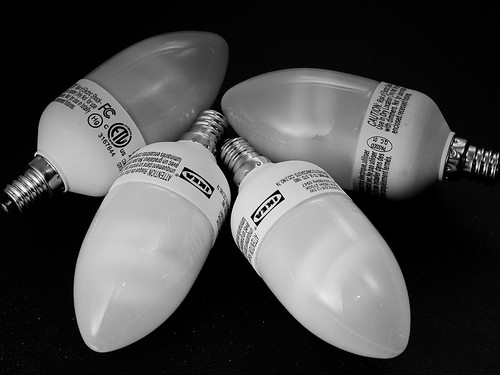
Four out of six dead Ikea E12 fluorescent bulbs.

Concept: 2 out of 5
Execution: 0 out of 5
Yeah, but: Don't waste your money.

The Long Version:  I purchase six Ikea E12 fluorescent bulbs from the the Orlando Ikea store in March of this year. According to the advertisement as well as the fine print on the side of the box they came in, they were supposed to have a nominal lifetime of 10,000 hours.

How long is 10,000 hours? If you were to power them for six hours/day, seven days/week, then you would get 1,667 days of illumination. That's a bit more than 4 1/2 years. I would have loved to have gotten even half of that lifespan. Instead, four of the six I purchased, or 2/3rds, are now dead and sitting in the recycling bin for pickup later this week.

This is not the first problem I've had with Ikea electrical and electronic equipment. Earlier in February I tried to return a pair of larger fluorescent bulbs that didn't last 30 days. We were told in no uncertain terms at the Ikea return desk that they would neither give us back our money nor exchange them for a new working pair (the later is what we wanted anyway). In addition I've got an Ikea floor lamp that won't turn on any more. What really stick in my craw are all the Ikea branded AA and AAA rechargeable battery kits I purchased last Christmas for all my electronic devices and that have also gone into the recycling bin. All, and I repeat all, would work for a time, then one day start to overheat during a recharge and then stop carrying a charge at all.

I've never had a series of problems like this with other brands of bulbs, batteries, and small electrical devices from other stores like I've had with Ikea products. I pay a premium for these devices in part because they're supposed to have a long operating life measured in years, not weeks or months at the most. I don't know if Ikea hit a bad batch, changed suppliers, or what. But these were all purchased over a period of time from November 2010 to March 2011, which tells me the problem is systemic, at least at the Orlando store. The combination of poor quality and poor customer service is a loyalty killer. I've purchased my last items at Ikea. For those of you who haven't, caveat emptor.

last updated 16 aug 2011

2011-06-28

Elsewhere on the Web: Rob Beschizza reviews the Energizer Flickering LED Candle


Concept: 5 out of 5
Execution: 5 out of 5
Yeah, but: Fuck it, let's review it anyway.

The Long Version: I can't think of the last time I laughed this hard at anything, let alone a product review. Rob Beschizza (of BoingBoing fame) has posted an audio review of the Energizer Flickering LED Candle.

Hear it on SoundCloud or via BoingBoing.

I have it playing in a loop through iTunes, and I can't even begin to choose my favourite part. It's a must-listen.


last updated 28 June 2011

2011-03-30

Eye-Fi Pro X2 Wireless SD Card


Concept: 3 out of 5
Execution: 1 out of 5
Yeah, but: Incidentally, the card does work.

The Long Version: The Eye-Fi card seems so promising – photos wirelessly zipping from the camera to the computer, no cables, and no hassels. Ah, if only it was that simple.

The card can't be used without being registered, so the first step is to install the software and connect to the web server. This is 2011, and something as simple as creating a login ID shouldn't be a huge challenge. Supply an email address, type in the chosen password twice, and Robert's your mother's brother. Again: if only.

Following the supplied start-up instructions, I installed the included Eye-Fi Center software, upgraded to the latest version over the internet, and then I was greeted by the New Account screen. When I chose a password I was told that it couldn't be used, but no reason why. I'd try a different one, and then I'd be told that the card couldn't be initialized and would need to be ejected and reinserted. And again. And again. Different email addresses, different passwords, or any combination of information just failed over and over again with cutsey little error messages that remind me why I hate Flickr. On a lark I tried the "Forgot your Password?" option, and it accepted one of my email addresses and sent me a reset link. Okay, now we're in business – don't know how, don't know why, but it's progress.

(I need to interrupt myself with an aside about the handy supplied SD card reader, and note that the software needed is embedded in the card. This is great for my laptop, since it doesn't have an SD reader built in, and worked just fine. Plugging the Eye-Fi card directly into the combined USB hub and card reader that I use for my desktop produced no results at all. Plugging the card into one of the USB ports on that same hub, using the supplied card reader, worked just fine. So even if you don't think you'll need it, you need it: I'm not sure why, but it's magic.)


I used the supplied link to change my password (to one that I was trying to use all along) and got into the manager program and registered the card. It wanted to update the firmware on my card, and as Garfield once said, if the rope's around your neck you might as well jump off the horse. I start the firmware update, am told not to remove the card, and then my computer tells me that the card was improperly ejected.

Extremely worried that "I" might have just turned my expensive Pro X2 (now with twice the Pro!) Eye-Fi card into an ineffective paperweight, I logged back into the software service. Or at least I tried to: it wanted to do the bad password / reinsert card dance again, as it insisted that the card was unregistered and there was no possible way I could already have an account. After a couple more attempts to log in I gave the old "Forgot your Password?" trick another try. This time it swore it had never heard of me and refused to accept that I had ever existed.

I honestly don't remember what eventually worked. I spent a lot of time reading through the support forums, where pretty much every problem – and a lot of them sounded familiar – was met with a request to contact customer service. I formatted the card a couple of times and did a little dance, but essentially it eventually just worked when it wouldn't work before. It's not like I had that many options, or found some secret passcode: I wasn't really doing anything wrong, so there was nothing for me to fix. It just wouldn't work.


I bought the "Pro X2" model for two reasons: it transfers raw files as well as movies and jpegs, and it can link directly to a computer without needing to join a larger wireless network.

The second feature is a no-brainer. The point of a wireless connection is convenience and spontaneity; if I have to return to (or establish) a trusted network with a router then connecting while away from home becomes anything from difficult to impossible. I took and edited the photos for this review on my lunch break, which wouldn't have been possible without the direct-connection Ad Hoc feature that's only available with the most expensive Eye-Fi card. This is such a fundamental ability that the less expensive cards are just as hard to endorse as the most expensive one – there's no 'sweet spot' on the price/performance curve.

The other feature that's unique to the "Pro X2" model is the ability to transfer raw files. But here's my problem: the Eye-Fi Center software configures the card, and can't be set differently for different computers. I don't want raw files going to my laptop, which is slow with a small hard drive and itty-bitty screen, but having my GH1 automatically transfer its files to my Command Centre desktop while I'm still taking photos is really useful. My options are to either format the card before and after each use, and only have one computer running at a time to stop the card from transferring the same files to each one, or to accept that I will have to hunt down and delete the photos that I don't want to have littering each different machine.

This wireless thing is far less handy than I thought it would be.


last updated 30 march 2011

2011-01-18

Barnes and Noble Nook Color

Olympus Nook

Concept: 3 out of 5
Execution: 1 out of 5
Yeah, but: Paper publishing is preferable to the Color Nook.

The Long Version: There's an interesting article on the NPR website, "Digital Divide Propels Barnes & Noble Past Rival", in which the author writes glowingly of the Barnes & Noble Nook Color and how it's opened up a gap between it and it's nearest brick-and-mortar rival, Borders. Based on my experience and the experience of my wife, the Nook Color is barely usable and not worth consideration in its present state. Which makes me wonder if the author actually used the Nook Color. I sincerely doubt Border's management will loose much sleep over the Nook Color, as the NPR article would have you believe.

It All Started...

My wife and I decided to give one another a Nook Color for Christmas. My wife is a veracious reader, and after 25-plus years in our current house, she's filled shelves, closets, and boxes with books of nearly every description. She's purchased so many books over the years that she could open her own (used) book store.

She wanted a Nook Color so she could ostensibly switch to e-books and save the space regular books consume. She, in turn, wanted to give me a Nook Color so I'd keep my hands off of her Nook Color; after nearly 30 years, she knows me all too well for the geek that I am, and she didn't want me tinkering about with hers. Her gift of a Nook Color to me was as much a defensive act as an act of love.

The decision to purchase the Nook Color was easy for us to make; we were drawn to it by its provenance and cost. We've been satisfied Barnes & Noble customers for many years, and have been a member of the Barnes & Noble discount club for almost as long as we've been customers. With that kind of good-will towards Barnes & Noble it was easy for us to purchase an e-reader made and sold by them. And at a cost of $250 the Nook Color is one of the cheapest color tablets on the market, far cheaper than the Apple iPad. It seemed like a very safe purchase to make.

When we purchased our Nook Colors I purchased mine on-line from Barnes & Noble while my wife purchased her's from Amazon. The Amazon purchase turned out to be problematic because of Amazon's 14-day return policy. Barnes & Noble had a much more customer-friendly return policy; their web site stated that they would accept any Nook Color return, if purchased after November 30th, opened or unopened, until January 31st, 2011.

Our Nooks were purchased on December 14th. We opened them Christmas day. After two weeks of working with the Nooks we decided to return them both by January 10th. Because of Amazon's return policy we were out of Amazon's return policy window. It is to the credit of Barnes & Noble that they accepted, for return, the Nook Color purchased through Amazon, and for that I am most grateful. But let me back up a bit and recount our experiences with the Nook Color and why we returned them.

Technical Specifications

The Color Nook is a color screen tablet computer. It is built around an 800 MHz ARM-core-A8-based Texas Instruments OMAP3621 processor with 512MB DRAM and 8GB of flash storage. The front contains a 7 inch diagonal 1024 by 600 pixel resolution capacitive multitouch color screen that is supposedly capable of displaying 16 million unique colors.

The operating system running on the Nook Color is based on Android 2.1, with extensions added by Barnes & Noble for the Nook Color. The specific Barnes & Noble OS version tested with the Nook Colors we had was 1.0.1. TheNooks initially shipped to us with version 1.0.0 installed. I downloaded the 1.0.1 version from Barnes & Noble and upgraded both via side-loading.

The Nook Color is powered by a rechargeable NiMh battery, which gave a practical limit of between five and six hours operation using the 1.0.1 OS release with WiFi enabled.

The exterior controls consist of an on/off push button on the top left, a pair of volume control push buttons on the top right, and a single control on the lower front in the shape of an inverted 'u', but meant to represent a lowercase 'n'. At the bottom edge is an industry-standard miniature headphone jack and a sub-miniature USB connector for both data and charging.

Presentation

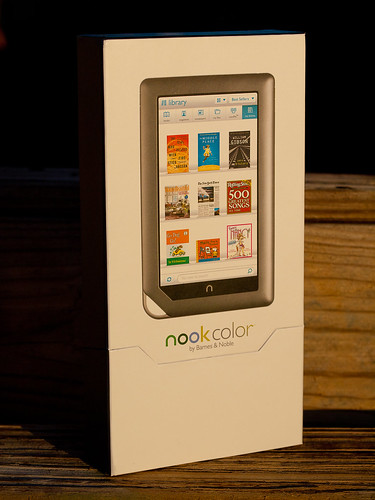
If there's one lesson Apple's success has taught the industry, it's that the initial packaging presentation is important to establishing overall customer satisfaction. Apple's packaging presentation is legendary. B&N's is not quite as legendary, but it's still quite nice and earns points for not having required as many dead trees as some of Apple's more elaborate packaging excesses.

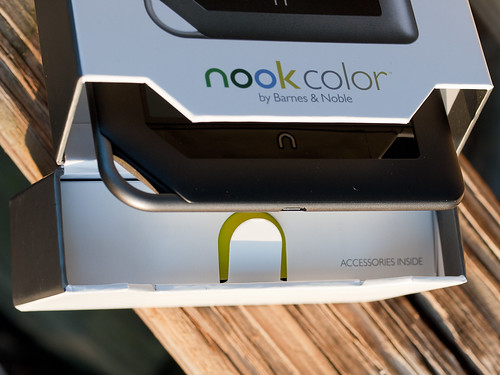
Color Nook Accessories Location

The Nook Color's box is simple to open. There are small magnets embedded in the lid and the opening to keep the lid closed or, when open, flat against the back of the box. The lid doesn't flop around.

In the lid itself is a simple box that is easy to pull out and open. It contains the Nook's four foot long USB to micro USB cable and a small wall wart to charge the Nook's internal battery. When the cable is not being used for data access, it plugs into the USB-style slot on the wall wart for charging.

Many more points are earned by the cable. The Nook use a standard micro USB connector, the same as many contemporary cell phones now use. It's a foot longer than an equivalent Apple cable (the Apple cable uses a proprietary connector into the iDevice), and it's a lot thicker and more robust. When not used to charge the Nook, the USB cable can be used to connect to a PC or a Mac and access the Nook's internal flash memory.

That's right; the Nook acts like an 8GB thumb drive when connected, and it's very simple to drag and drop content such as JPEGs, MP3s, and other electronic content to and from the Nook. From a data perspective, it's an open device. More points to the Nook for being so open.

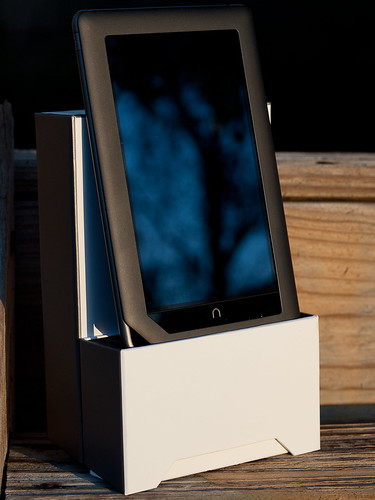
Color Nook in Case Holder

What's clever about the box is that the end of the lid contains a foam insert with a slot cut out the same width as the Nook. With the box opened it acts as a simple holder for the Nook.

Operations

With all those good points, why were the Nooks returned? The Nooks were returned because their performance was awful. Whether it was trying to flip between the virtual pages of an electronic book, or trying to scroll a web page using the built-in browser, or trying to interact with the Nook in general, the Nook would either freeze during an operation, inconsistently recognize finger interactions, or scroll in a very choppy and annoying fashion.

In stark contrast, any iDevice you can purchase from Apple is buttery smooth in its operations and highly consistent and predictable in its interactions.

My wife is a very forgiving woman, and will blame herself for a device's intransigence before she blames the device, but after two weeks of fighting her Nook she realized it wasn't her and finally had me return it.

My experiences were far worse. Not only was performance choppy, but I lost track of the number of times I locked my Nook up with the built-in web browser. Every time the Nook locked, I had to hold down the on/off button to force the Nook to power down completely and reset the device. Then I'd power it back up again.

Other issues I had concerned it's inability to read any PDF I tried to load on the device, and the limited color range for JPEG images. The Nook would appear to open PDF files, and display the front page, but it would never display any other page in the document.

Remember those 16 million colors the Nook is supposed to display? The current Nook Color will only display a far smaller number; JPEGs that display smooth tonalities on most other devices (iDevice, Mac or PC) show up as step-wise color messes on the Nook, with dark areas completely black and light areas blown out.

To add insult to injury, the device I gave to my wife had to be exchanged December 27th when the Nook stopped playing any audio. My wife had set up an account with Pandora, and was enjoying the streaming music when it simple stopped playing. No reseting of the Nook would correct the problem; in the end we had to drive to a downtown Orlando store and exchange it.

Return and Final Comments

Let me take a moment to praise a local Orlando member of Barnes & Nobles staff; Tammy Randoph. Tammy works at our local Barnes & Noble at Sandlake Road and Dr. Phillips Blvd. When it came time to return my wife's Nook, Tammy credited our account for the device, even though we didn't have the receipt and it wasn't purchased at her store. It turned out that exchanging my wife's Nook "reset the clock" and removed the initial purchase record. According to Barnes & Noble's system it appeared as if her Nook was actually purchased on December 27th.

The other Nook had to be shipped back (free shipping) to Barnes & Noble for a full refund.

It's excellent customer service that makes us loyal Barnes & Noble customers, in spite of our negative experience with the Nooks.

The on-line press has been reporting since December 2010 that Barnes & Noble was near to releasing an Android 2.2 version for the Nook Color that would address most, if not all the issues we encountered with our copies. But as I was standing at the local Barnes & Noble to return my wife's Nook, one of the staff (not Tammy) remarked that if we waited until February, Barnes & Noble would release Android 2.2. When I realized this magic release was sliding to the right, I finally and completely gave up on this version of the Nook. I wasn't going to wait for a new OS release that might, or might not, make the Nook Color the type of device it should have been at its release.

I continue to be a loyal Barnes & Noble customer, and still enjoy the regular stop by the book store to browse and purchase books. But it's going to take a lot of work on the software side before I'll consider purchasing another Nook Color.
last updated 18 january 2011

2010-04-16

Callpod Fueltank Uno


Concept: 3 out of 5
Execution: 1 out of 5
Yeah, but: It does work.

The Long Version: The Callpod Fueltank Uno (manf) is the mid-air refueling tanker of the smartphone world. It's a rechargeable battery with a port to charge it and a port to charge something else, with a few LEDs in between. The casing is an uninterrupted translucent grey plastic; the charge light and power level indicators shine through it with plenty of oomph. The point of the device is that it can be relied on to give a boost, or a full-dose recharge, to small devices that can't otherwise make it to a wall outlet, car charger, or other source of power. It can't help out something the size of a laptop, but with care, it can more than double the running time my Blackberry Bold 9000.


Callpod's Fueltank comes in two sizes, the Uno and Duo. The Duo has twice the capacity of the one that's named after the popular card game, but I picked the smaller one that's easier to carry. It will be enough to get me through a couple of days where I won't have guaranteed access to power, and because I'll never be in one place for very long I can't risk being without web access and my trusty GPS. For the past couple of weeks I've been testing the Fueltank, and it works well for what it says it does. It does a full charge without any problem, and if I don't leave it connected overnight, I can usually get a second charge out of it as well. That's plenty for a weekend away.


Naturally, the Fueltank needs to be charged so that it can do its thing. It comes will a wall-wart adapter with a mini-USB cable permanently attached, which plugs into the port on the battery pack. While not all USB-style power supplies put out exactly the same power, I've never experienced any problems when I use them for different devices. (Caution: your milage may vary; your device may catch on fire.) So if I'm able to charge my fueltank, then I'm also able to charge my phone. There is a certain irony there, but being able to keep the booster fed from the same charger that handles everything else is a huge benefit for traveling. Three cables and one little power brick can handle my Blackberry, Penny's Palm Pre, our family of iPods, my portable photo hard drive, and the Callpod Fueltank. I love ubiquity and commonality - it makes life so much easier. And with that thought in mind, the happy part of my review ends right now.


Turning the Fueltank over, we see the port it uses to charge other devices. It's a proprietary 8-pin connector that looks like - but isn't quite - one of those tiny little micro-USB jacks. This means that the common cables that we all already have for our various devices won't work with the Callpod. So now we need to carry the cable to charge the devices directly as well as a second one to use the oh-so-handy backup battery. And if that unique cable gets lost, good luck finding it in stores. Best Buy - the store named after an expiration date - is the big retailer that sells Callpod products, but currently doesn't even list the little adapters on its website. They're only available directly through Callpod's web store. We'll get back to that in a minute, but first let's take a look at the adapter cable itself.


This is one of the two cables that Callpod includes with the Fueltank Uno, with the standard mini-USB connector on the left and its nasty custom plug on the right. You might notice that it's labeled 'TOP' - to make it easier to insert into the nearly-symmetrical charging port - so it's clear that someone in the design team knew that they had a problem, but couldn't think of any other way to fix it. The result is lazy, sloppy, and inadequate. Using a custom and proprietary connection is fine if there's a good reason for it and it's well executed, but this has neither attribute in its favour. The connection itself is unreasonably difficult to use, even worse than the various USB plugs, and since Callpod chose this one all on their own it's completely their fault that it's so badly designed. Using a standard USB-A jack would remove a whole lot of the fine print from Callpod's claim that the Fueltank is "Compatible with 3,000+ Devices".


Two photos ago we saw the port that the adapter plugs into, and this is the business end of Callpod's chosen connector. Quick - which way does it go in? Now imagine having to plug it in in a dark hotel room, on a moving bus, or trying to connect it by feel in your carry-on bag at your feet because there's not enough room on the plane to bring it up to your lap. These are exactly the conditions that the Fueltank is useful for, and it falls down badly because of this nasty little cable that solves nobody's problems. The only good thing that I can say about it is that at least it's so short (3.25", 82mm) that it can't tangle up, and doesn't stick out when I strap it to the side of the Fueltank. I keep it there with a velcro cable organizer because if I lose it, the Fueltank is useless until I get a replacement mailed to me - exactly what I want in a travel-ready emergency backup.


I mentioned previously that the Fueltank Uno comes with two adapters: the mini-USB and one for Apple's iPod variants, such as the Mini, Classic, and Telephone. It also includes a voucher for a 'free' (read: cost built into purchase price) adapter cable just in case your device needs a different connection. The Palm Pre that Penny uses has the industry-standard micro-USB charging connection, so that's the one that I ordered. If I had done more research, I would have seen that Callpod does offer a female USB-A adapter - search for style USBA-0001 - that would make the Fuelcell compatible with any standard cable. If nothing else, it proves that there's no practical reason not to have just included the female USB-A port right in the battery pack from the very beginning. That only leaves a non-engineering, non customer-service reason: the absolutely massive profit margins on cables. Callpod sells their custom cables for $10 without needing to discount for wholesalers, and if it costs them more than a dollar each, I'd be staggered.


Fortunately, Callpod includes 'free' USPS International mail for customers who are redeeming a voucher. And it seems like I've finally found a company likes dealing with UPS even less than I do. For the Worldwide Expedited service, which is one of the 'service levels' that includes the massive hidden fees, they want $114.13. That's not a typo - or at least, not my typo - they want ONE HUNDRED and fourteen dollars. To put that in perspective, B&H Photo will ship me a Nikon D3x and 70-200/2.8 mkII, ten thousand dollars worth of heavy camera gear, for an even hundred via the same service. But at least Callpod's UPS prices aren't completely out of whack, since their charge for sending an envelope through the "UPS Express Saver" service is $122.48, which aligns to the $114.75 that shipping my dream camera system would cost. For buying a Callpod cable outright, their cheapest shipping option remains USPS International, but at the time of writing it costs $6.66. And yes, I have a screenshot of that, too. I couldn't make this stuff up if I tried.


There are several things that I consider when I choose a rating. If I like something enough that I can't stop talking about it when someone asks, that's worth a '3'. If I dislike something enough to rant about it when someone asks, that's a '1'. That combination is where I find myself with the Callpod Fueltank Uno: it's a great idea, the product does exactly what it says, and it works for what I want it for. It has some strong features, including a good power reserve at a reasonable size. At the same time, the need to use a badly designed custom and hard-to-get cable ranges from a mild but ongoing nuisance to a critical failure that leaves the Fueltank unusable. I'm happy to have it, but if mine gets lost or stolen tomorrow, I wouldn't buy another one without taking a long, hard look at my other options.


2010-02-26

Maha Powerex MH-C801D Charger


Concept: 3 out of 5
Execution: 3 out of 5
Yeah, but: Dinosaur not included.

The Long Version: There are certain things in life that are basic necessities. For photographers, flashlight collectors, and general electronics junkies, those ubiquitous AA batteries are inescapable. Unfortunately, so are cheap chargers - the sort of thing that comes in a set for an extra ten dollars. These chargers aren't terrible, and that's exactly what's wrong with them. They do the job well enough that they take the place of better ones, without being good enough for serious use.

The Maha C801D is the grand-daddy of hard-core chargers. It's been given rave reviews by Imaging Resource, Digital Dingus, and pretty much everyone on Amazon; it's even used by Joe 'Speedlight' McNally. It can fully charge eight AA batteries in an hour, or do a 'soft charge' that's easier on the cells but takes a little longer. There's also a button to do a full discharge-charge cycle to condition the batteries and keep them in their best condition. Each battery is on its own circuit, ensuring that they get their ideal treatment. While I don't have the ability to run any tests, I do get the distinct impression that my flashes are giving me more pops per charge.


Besides having the largest AC power brick in the known universe, the other distinctive feature of the C801D is its two identical buttons on opposite sides of the LCD. One of them will do a two-hour soft charge, and should be pressed whenever there's enough time for a more leisurely pace. The other button is for the conditioning cycle, which can take 12-14 hours to complete. The functions are marked in the plastic, but it's not the most visible or clear. Fortunately, I have a handy pack of stickers that I bought to let me distinguish between my two SB600's. It turned out to be an easy fix.

If only more of life's problems could be solved with the judicious application of dinosaur stickers.


2010-02-18

Behringer Tube UltraGain MIC200 Preamp/Direct Box


Concept: 3 out of 5
Execution: 4 out of 5
Yeah, but: The Price Is Right


The Long Version: One year ago we were at a party and after a few too many whiskys I suggested to my friends that we “put the old band back together” but that instead of running sound, I would play bass.
They called my bluff, and it’s been going great.
But I still don’t have a bass amp of my own, and borrowing got old after the second time.

As a professional sound engineer for over 20 years, I have dealt with almost every bass amp on the market and have come to a few conclusions as to what would work for me.
Foremost in my mind was to get the most accurate sound straight from the bass sent to the mixing board. Most bass amps have an output for this purpose, and it’ll usually be switchable so as to bypass the amp’s graphic EQ or other tone modifiers, but none of them are as close to the source as I would like.

When confronted with the ugly tone many amps are forced to produce as a crutch for bad players, the next best option is to use a “Direct Box” between the instrument and amp.
This is a simple box with a transformer that converts a high impedance instrument’s signal to the low impedance preferred by mixing boards, while also providing a hard-wired ¼” output to the amp. They don’t affect the player’s tone onstage, but they also don’t give the engineer a surplus of signal to work with and are as low-tech as it gets.

While taking a crap a few months back I was reading my B&H PhotoVideo catalog and stumbled upon a neat little device I had never seen before, the Behringer Tube UltraGain MIC200 Preamp/Direct Box.

Getting right to the heart of the matter, this little box rocks.
It has ALL of the features of the very best direct boxes, then goes to 11 by not only including a 12AX7 vacuum tube in the signal path but also giving the user voicing options and a limiter.
For those who don’t know about such things, a 12AX7 tube is the heart of most of the greatest sounding guitar amps since the 1950s.
If you crank up the input gain and send too much signal into one of these, it’ll get a bit hotter to the touch and might distort a bit, but the distortion will be very pleasing to the ears compared with what happens in a solid state device: even-order harmonics instead of the much harsher-sounding odd-order harmonics.
I already have some speaker cabinets, so all I need now is a power amp to complete my rig.

Glowing Tube = Tone!

For people who have a ProTools-based recording environment, this is an easy and affordable way to get some analog warmth without sacrificing signal integrity.

Using mine in both a recording and live environment I can report complete satisfaction.
Since I only play active basses with 3-band EQs, it was easy to get an amazing tone through the front-of-house system while also enjoying better sound than usual through my borrowed stage amp.
Standing in front of my band Loud Nine’s Crown-powered Peavey FOH speakers (SP4 & FH18) I noticed that my bass tone was far superior to anything I had heard previously. Clean, precise, solid, and I can get it to growl with the twist of one retro-looking knob.

Negative Points are awarded to the 8 voicings that use Behringer’s limiter (right side of the knob).
It is much too slow to respond, so the first 4 notes of a song will be way too loud before it clamps down on the output level.

If you buy one of these I strongly recommend visiting your local Goodwill or other thrift store to locate a spare 9vAC/1.3amp+ wall-wart power supply with the proper connector and polarity.
Because I use several Alesis products I’m very aware of the need to keep spare power supplies with me when they are 9volt AC compared to the more reliable DC units.

I have used many of Behringer's products over the last 10+ years with great results. They do what they're supposed to do and at much lower prices than the competition.
However, their gear doesn't stand up to the abuse of touring very well.
Mixing boards have had multiple channels die, stereo compressors have become mono compressors, and a failed crossover nearly ruined a show.
Bottom line is that the German design is fantastic, while the Chinese manufacturing can be improved.
My MIC200 travels in a padded case and sits on a sticky rubber mat to keep it from vibrating off the amp and hitting the floor.

Price?
Got mine from B&H for $40 with free shipping.
(ART sells a similar unit for more, and plain direct boxes with none of it's features also can cost more).
The MIC100 model omits the voicings knob, and goes for $30.

These units represent a significant value, and I recommend them highly.

contact me...

You can click here for Matthew's e-mail address.