Concept: 3 out of 5
Execution: 1 out of 5
Yeah, but: Paper publishing is preferable to the Color Nook.
The Long Version: There's an interesting article on the NPR website, "
Digital Divide Propels Barnes & Noble Past Rival", in which the author writes glowingly of the Barnes & Noble Nook Color and how it's opened up a gap between it and it's nearest brick-and-mortar rival, Borders. Based on my experience and the experience of my wife, the Nook Color is barely usable and not worth consideration in its present state. Which makes me wonder if the author actually used the Nook Color. I sincerely doubt Border's management will loose much sleep over the Nook Color, as the NPR article would have you believe.
It All Started...
My wife and I decided to give one another a Nook Color for Christmas. My wife is a veracious reader, and after 25-plus years in our current house, she's filled shelves, closets, and boxes with books of nearly every description. She's purchased so many books over the years that she could open her own (used) book store.
She wanted a Nook Color so she could ostensibly switch to e-books and save the space regular books consume. She, in turn, wanted to give me a Nook Color so I'd keep my hands off of her Nook Color; after nearly 30 years, she knows me all too well for the geek that I am, and she didn't want me tinkering about with hers. Her gift of a Nook Color to me was as much a defensive act as an act of love.
The decision to purchase the Nook Color was easy for us to make; we were drawn to it by its provenance and cost. We've been satisfied Barnes & Noble customers for many years, and have been a member of the Barnes & Noble discount club for almost as long as we've been customers. With that kind of good-will towards Barnes & Noble it was easy for us to purchase an e-reader made and sold by them. And at a cost of $250 the Nook Color is one of the cheapest color tablets on the market, far cheaper than the Apple iPad. It seemed like a very safe purchase to make.
When we purchased our Nook Colors I purchased mine on-line from Barnes & Noble while my wife purchased her's from Amazon. The Amazon purchase turned out to be problematic because of Amazon's 14-day return policy. Barnes & Noble had a much more customer-friendly return policy; their web site stated that they would accept any Nook Color return, if purchased after November 30th, opened or unopened, until January 31st, 2011.
Our Nooks were purchased on December 14th. We opened them Christmas day. After two weeks of working with the Nooks we decided to return them both by January 10th. Because of Amazon's return policy we were out of Amazon's return policy window. It is to the credit of Barnes & Noble that they accepted, for return, the Nook Color purchased through Amazon, and for that I am most grateful. But let me back up a bit and recount our experiences with the Nook Color and why we returned them.
Technical Specifications
The Color Nook is a color screen tablet computer. It is built around an 800 MHz
ARM-core-A8-based
Texas Instruments OMAP3621 processor with 512MB DRAM and 8GB of flash storage. The front contains a 7 inch diagonal 1024 by 600 pixel resolution capacitive multitouch color screen that is supposedly capable of displaying 16 million unique colors.
The operating system running on the Nook Color is based on Android 2.1, with extensions added by Barnes & Noble for the Nook Color. The specific Barnes & Noble OS version tested with the Nook Colors we had was 1.0.1. TheNooks initially shipped to us with version 1.0.0 installed. I downloaded the 1.0.1 version from Barnes & Noble and upgraded both via side-loading.
The Nook Color is powered by a rechargeable NiMh battery, which gave a practical limit of between five and six hours operation using the 1.0.1 OS release with WiFi enabled.
The exterior controls consist of an on/off push button on the top left, a pair of volume control push buttons on the top right, and a single control on the lower front in the shape of an inverted 'u', but meant to represent a lowercase 'n'. At the bottom edge is an industry-standard miniature headphone jack and a sub-miniature USB connector for both data and charging.
Presentation
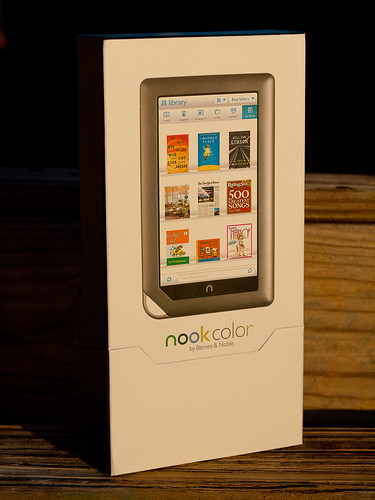
If there's one lesson Apple's success has taught the industry, it's that the initial packaging presentation is important to establishing overall customer satisfaction. Apple's packaging presentation is legendary. B&N's is not quite as legendary, but it's still quite nice and earns points for not having required as many dead trees as some of Apple's more elaborate packaging excesses.
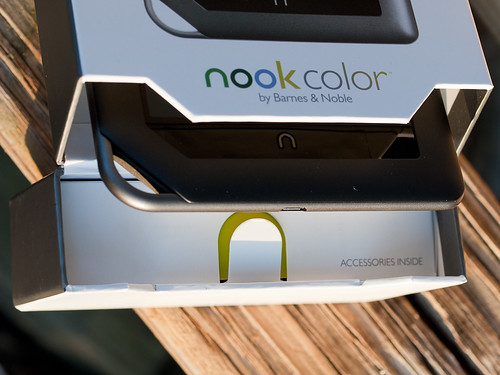
The Nook Color's box is simple to open. There are small magnets embedded in the lid and the opening to keep the lid closed or, when open, flat against the back of the box. The lid doesn't flop around.
In the lid itself is a simple box that is easy to pull out and open. It contains the Nook's four foot long USB to micro USB cable and a small wall wart to charge the Nook's internal battery. When the cable is not being used for data access, it plugs into the USB-style slot on the wall wart for charging.
Many more points are earned by the cable. The Nook use a standard micro USB connector, the same as many contemporary cell phones now use. It's a foot longer than an equivalent Apple cable (the Apple cable uses a proprietary connector into the iDevice), and it's a lot thicker and more robust. When not used to charge the Nook, the USB cable can be used to connect to a PC or a Mac and access the Nook's internal flash memory.
That's right; the Nook acts like an 8GB thumb drive when connected, and it's very simple to drag and drop content such as JPEGs, MP3s, and other electronic content to and from the Nook. From a data perspective, it's an open device. More points to the Nook for being so open.
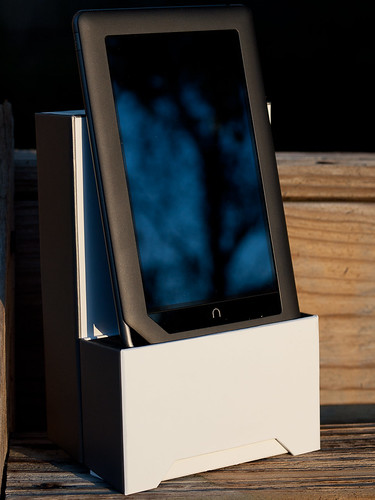
What's clever about the box is that the end of the lid contains a foam insert with a slot cut out the same width as the Nook. With the box opened it acts as a simple holder for the Nook.
Operations
With all those good points, why were the Nooks returned? The Nooks were returned because their performance was awful. Whether it was trying to flip between the virtual pages of an electronic book, or trying to scroll a web page using the built-in browser, or trying to interact with the Nook in general, the Nook would either freeze during an operation, inconsistently recognize finger interactions, or scroll in a very choppy and annoying fashion.
In stark contrast, any iDevice you can purchase from Apple is buttery smooth in its operations and highly consistent and predictable in its interactions.
My wife is a very forgiving woman, and will blame herself for a device's intransigence before she blames the device, but after two weeks of fighting her Nook she realized it wasn't her and finally had me return it.
My experiences were far worse. Not only was performance choppy, but I lost track of the number of times I locked my Nook up with the built-in web browser. Every time the Nook locked, I had to hold down the on/off button to force the Nook to power down completely and reset the device. Then I'd power it back up again.
Other issues I had concerned it's inability to read any PDF I tried to load on the device, and the limited color range for JPEG images. The Nook would appear to open PDF files, and display the front page, but it would never display any other page in the document.
Remember those 16 million colors the Nook is supposed to display? The current Nook Color will only display a far smaller number; JPEGs that display smooth tonalities on most other devices (iDevice, Mac or PC) show up as step-wise color messes on the Nook, with dark areas completely black and light areas blown out.
To add insult to injury, the device I gave to my wife had to be exchanged December 27th when the Nook stopped playing any audio. My wife had set up an account with Pandora, and was enjoying the streaming music when it simple stopped playing. No reseting of the Nook would correct the problem; in the end we had to drive to a downtown Orlando store and exchange it.
Return and Final Comments
Let me take a moment to praise a local Orlando member of Barnes & Nobles staff; Tammy Randoph. Tammy works at our local Barnes & Noble at Sandlake Road and Dr. Phillips Blvd. When it came time to return my wife's Nook, Tammy credited our account for the device, even though we didn't have the receipt and it wasn't purchased at her store. It turned out that exchanging my wife's Nook "reset the clock" and removed the initial purchase record. According to Barnes & Noble's system it appeared as if her Nook was actually purchased on December 27th.
The other Nook had to be shipped back (free shipping) to Barnes & Noble for a full refund.
It's excellent customer service that makes us loyal Barnes & Noble customers, in spite of our negative experience with the Nooks.
The on-line press has been reporting since December 2010 that Barnes & Noble was near to releasing an Android 2.2 version for the Nook Color that would address most, if not all the issues we encountered with our copies. But as I was standing at the local Barnes & Noble to return my wife's Nook, one of the staff (not Tammy) remarked that if we waited until February, Barnes & Noble would release Android 2.2. When I realized this magic release was sliding to the right, I finally and completely gave up on this version of the Nook. I wasn't going to wait for a new OS release that might, or might not, make the Nook Color the type of device it should have been at its release.
I continue to be a loyal Barnes & Noble customer, and still enjoy the regular stop by the book store to browse and purchase books. But it's going to take a lot of work on the software side before I'll consider purchasing another Nook Color.
last updated 18 january 2011



 Posts
Posts



